
If you’ve recently opened the Lifecycle tab in VCF Operations on a 9.1 environment and hit a wall of red TLS errors, Broadcom published KB 448618 to address it. I wanted to break down what’s happening because the root cause goes beyond the usual “certificate expired, renew it” situation.
What You’ll See
The error shows up the moment you navigate to the Lifecycle section in VCF Operations. Instead of your fleet component details, you get something like this:
upstream connect error or disconnect/reset before headers. retried and the latest
reset reason: remote connection failure, transport failure reason:
TLS_error:|268435581:SSL routines:OPENSSL_internal:CERTIFICATE_VERIFY_FAILED:TLS_error_end

Unable to retrieve fleet lifecycle component details
That on its own doesn’t tell you much. Check the vcf-fleet-build-service-fleetbuild log instead, where a Java stack trace points straight at the problem:
Caused by: java.security.cert.CertificateExpiredException:
certificate expired on 20260713150319GMT+00:00
Expired certificate. Straightforward, right? Except cert-manager already generated a replacement weeks ago. The services just never picked it up.
The Root Cause: Cached Certificates in Memory
This is a caching bug. Three services in VCF 9.1, specifically vcf-sddc-lcm, vcf-fleet-lcm, and salt-raas, load their TLS certificate into memory at startup and never check whether a newer one has appeared on disk.
The cert-manager component handles automated rotation correctly. It generates a fresh certificate (Cert B) at the 60-day mark, well before the original (Cert A) expires at day 90. The new cert sits on disk, ready to go. But the running service process doesn’t know about it. It’s still serving the original from its in-memory cache.
When day 90 arrives and Cert A expires, the service fails. The replacement has been there for a month. Nobody loaded it.
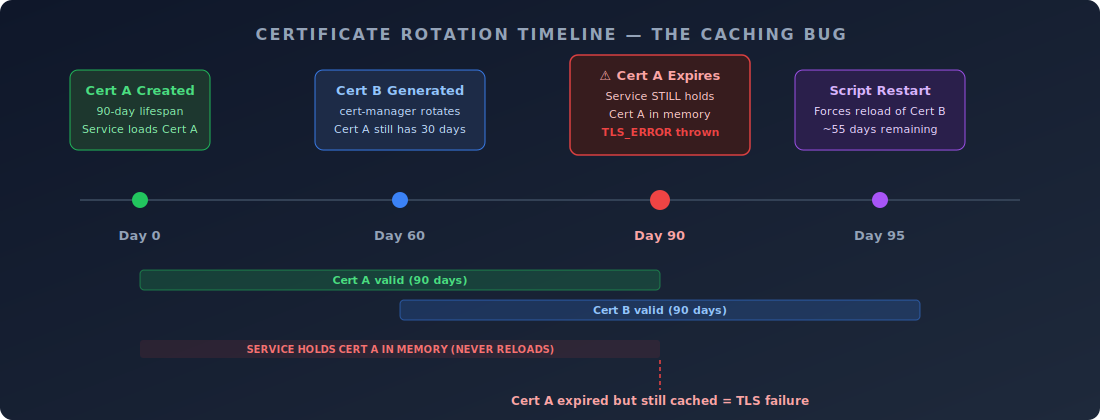
In the timeline above, the green bar is Cert A, the blue bar is Cert B. cert-manager does the right thing by generating Cert B with 30 days of overlap. The problem is that red bar at the bottom: the service never releases Cert A from memory.
When I First Hit This in My Lab
In my VCF 9.1 nested lab, everything ran fine for the first couple of months. No warnings, no hints. Then one morning I logged into VCF Operations to check bundle availability and got the TLS error. My first thought was that I’d broken something, maybe the internal CA had fallen over, or I’d accidentally tampered with a certificate during one of my lab experiments. Checked both. Neither was the case.
Digging into the fleet build service logs on the control plane node confirmed the expired cert timestamp. What threw me off initially was that the certificate had actually expired two days earlier, on a day when I hadn’t been in the lab at all. So the error had been silently waiting for my next login.
The Workaround
Broadcom’s workaround is a script that restarts the three affected services, forcing them to reload the current valid certificate from disk. It gets you running again, though the underlying issue, services not watching for cert changes, is still there. A permanent fix is scheduled for an upcoming maintenance release.
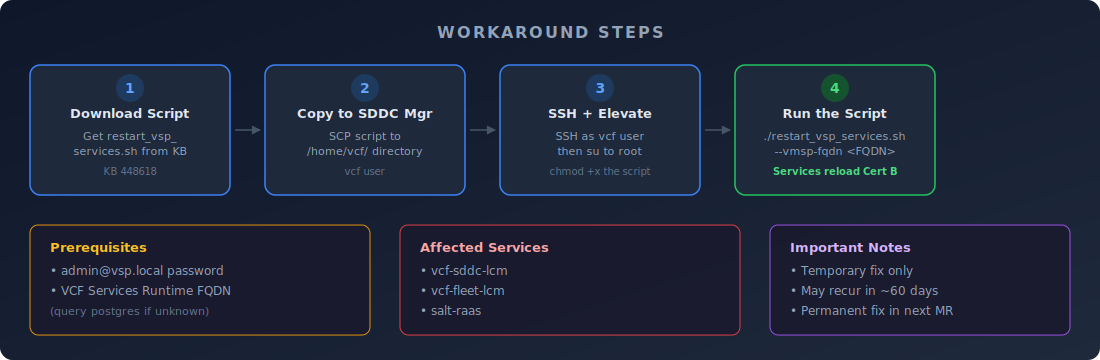
Here’s the process step by step:
Prerequisites
You need two things before you start. First, the admin@vsp.local password. In most deployments this matches the vmware-system-user password, but if you’ve changed it or aren’t sure, Broadcom has a separate KB (KB 444456) for resetting it.
Second, you need the VCF Services Runtime FQDN. If you don’t know it off the top of your head, SSH into the SDDC Manager as vcf, elevate to root, and query postgres:
psql -h localhost -U postgres -d platform \
  -c "select primary_fqdn from vsp_cluster where type='MANAGEMENT';"
Running the Script
Download restart_vsp_services.sh from the KB article and SCP it to /home/vcf/ on the SDDC Manager. Then:
# SSH as vcf, then elevate
ssh vcf@sddc-manager.yourdomain.local
su -

# Make executable and run
chmod +x /home/vcf/restart_vsp_services.sh
cd /home/vcf/
./restart_vsp_services.sh --vmsp-fqdn your-vsp-fqdn.yourdomain.local
The script restarts the three services, they load Cert B from disk, and the Lifecycle tab comes back immediately. In my lab the whole thing took under two minutes.
How Long Does the Fix Last?
Depends on when you run it. The workaround forces a certificate reload, not a renewal. Run the script 5 days after Cert A expired and Cert B still has roughly 55 days left. Wait 30 days and you’ve only got 30 days before the same cycle repeats with Cert B.
To check exactly when the current certificates expire, SSH to a Control Plane node (you can find these under VCF Operations UI > Build > Lifecycle > Components > VCF Services Runtime > Nodes), elevate to root, and run:
kubectl get certificate fleet-upgrade-service-intra-cert \
  -n vcf-fleet-lcm -o jsonpath='{.status.notAfter}'

kubectl get certificate sddc-upgrade-service-intra-cert \
  -n vcf-sddc-lcm -o jsonpath='{.status.notAfter}'

kubectl get certificate raas-instance-cert \
  -n salt-raas -o jsonpath='{.status.notAfter}'
I’d recommend setting a calendar reminder based on those dates. When I ran these in my lab, the notAfter timestamps gave me about 50 days of headroom after the restart, which is plenty of time assuming Broadcom ships the permanent fix in the next maintenance release.
VCF Automation Is Affected Too
If you’re also running VCF Automation, the same class of bug hits there as well. Broadcom published a companion article, KB 450789, covering the Automation-specific symptoms and workaround. The underlying cause is identical: services caching an expired certificate instead of loading the rotated replacement.
Takeaway
What makes this one frustrating is that everything around it works correctly. The CA is fine. cert-manager rotates on schedule. The replacement cert is valid, sitting right there on disk. The only failure is that a running process never goes back to check. Automated certificate rotation solves half the problem; the consuming service still has to notice that the rotation happened.
For now, grab the script, run it, and note the notAfter dates. I’ve got a calendar reminder set for mine. If you want to go further, a cron job that checks certificate expiry and alerts you a week out would stop this from catching you a second time.