
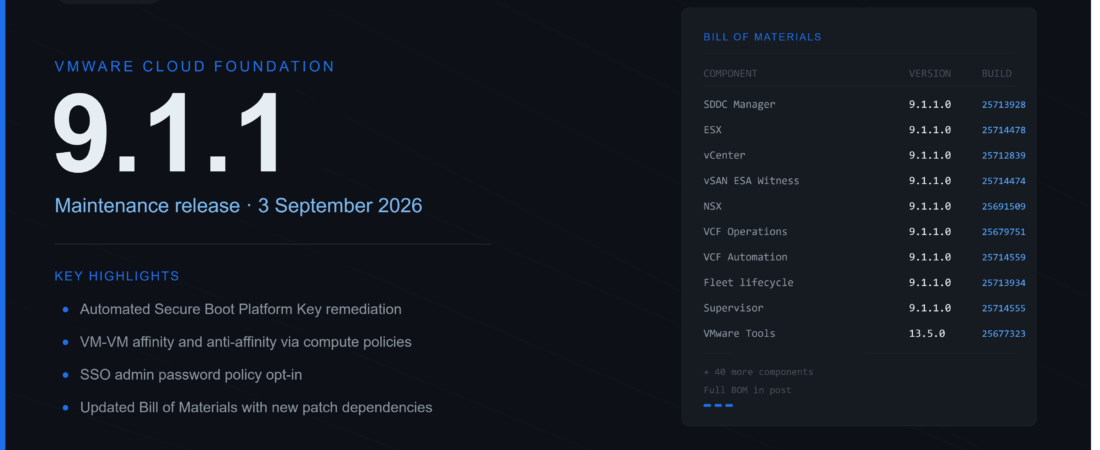
Broadcom dropped VCF 9.1.1.0 today, September 3rd. I saw the version number floating around this morning and had to go dig through the release notes myself to confirm it wasn’t just a rumor. It’s a maintenance release, so don’t expect fireworks, but there’s one fix in here that a lot of us have been waiting on.
What’s actually in this release
VCF calls 9.1.1.0 a maintenance release focused on supportability, and that’s a fair description. There’s no headline feature the way 9.1.0 had memory tiering. What you get instead is a pile of fixes across vCenter, ESX, vSAN, and the rest of the stack, plus one piece of hardware enablement that matters more than it sounds.
The Microsoft 2011 Secure Boot certificate expiration has been looming for a while. The UEFI and KEK CA 2011 certs expire in June 2026, and the Windows Production PCA 2011 cert follows in October. If you’ve got Secure Boot enabled VMs, this affects you, whether you’ve been thinking about it or not.
VCF 9.1.1.0 brings three things to deal with it. A new vCenter alarm warns you when a powered-on, Secure Boot enabled VM has an out-of-date NULL Platform Key. ESX can silently update that PK on VMs that don’t have a vTPM, which happens during a normal guest reboot. And for vTPM-enabled Windows VMs, there’s a Capsule PK Update mechanism that patches things without knocking out TPM-based apps mid-reboot. That last one needs VMware Tools 13.1.5 and the July 2026 Windows Cumulative Update installed first, so plan the order there or you’ll be troubleshooting a driver that never loaded.
If your Windows VMs don’t have the July 2026 Cumulative Update installed before you upgrade VMware Tools to 13.1.5, the Capsule PK update driver won’t install. There’s no error, it just silently skips. You’ll think the PK was remediated when it wasn’t. Install the Windows CU first, then upgrade Tools. Also note that Windows Server 2016, Windows 10 64-bit 22H2, and 1809 aren’t supported yet for Capsule PK updates, that comes in a future Tools release.
There’s also a new opt-in setting for password expiry and lockout policies on the vCenter SSO administrator account. By default nothing changes, the account still never expires or locks out. If you want stricter policy, it’s an API call, not a UI toggle yet. Here’s the exact call from the release notes:
curl -sk -X PATCH \
  "https://<vcenter-fqdn>/api/identity/admin/administrator/password-policy" \
  -H "vmware-api-session-id: ${session}" \
  -H "Content-Type: application/json" \
  -d '{"enable_expiry_policy": true, "enable_lockout_policy": true}'
By default the account is opted out, so existing behavior is preserved. The VCF Operations UI doesn’t expose this setting in 9.1.1.0, API only for now.
And if you’ve been waiting on VM-VM affinity and anti-affinity rules through compute policies, they’re here now, for both regular VMs and ones created through VM Service.
Full Bill of Materials
I pulled the complete BOM straight from the release notes. Every component, every build number. I’m putting the whole thing here so I don’t have to go digging through the docs site every time I need a build number for my own lab.
Core platform
| Component | vSphere Foundation | Version | Build |
|---|---|---|---|
| VCF Installer / SDDC Manager | Yes (VCF Installer) | 9.1.1.0 | 25713928 |
| ESX | Yes | 9.1.1.0 | 25714478 |
| vCenter | Yes | 9.1.1.0 | 25712839 |
| vSAN ESA Witness | Yes | 9.1.1.0 | 25714474 |
| vSAN File Services | Yes | 9.1.1.0 | 25714478 |
| vSAN OSA Witness | Yes | 9.1.1.0 | 25714473 |
| NSX | 9.1.1.0 | 25691509 | |
| VCF Operations | Yes | 9.1.1.0 | 25679751 |
| Cloud proxy | Yes | 9.1.1.0 | 25679891 |
| License server | Yes | 9.1.1.0 | 25679819 |
| VCF Operations for networks | 9.1.1.0 | 25682214 | |
| VCF Operations HCX | 9.1.1.0 | 25690219 | |
| VCF Operations orchestrator | Yes | 9.1.1.0 | 25679883 |
| VCF Automation | 9.1.1.0 | 25714559 | |
| Supervisor | Yes | 9.1.1.0 | 25714555 |
| VKS Add-ons | Yes | 3.7.0+20260618 | 25497365 |
| vSphere Kubernetes releases | Yes | 1.34.2+vmware.2-vkr.2 | N/A |
| Fleet lifecycle | Yes | 9.1.1.0 | 25713934 |
| Identity broker | 9.1.1.0 | 25679886 | |
| Log management | Yes | 9.1.1.0 | 25679624 |
| Real-time metrics | 9.1.1.0 | 25679622 | |
| Real-time metrics store | 9.1.1.0 | 25714471 | |
| Salt RaaS | 9.1.1.0 | 25679895 | |
| Salt master | 9.1.1.0 | 25679895 | |
| SDDC lifecycle | Yes | 9.1.1.0 | 25713940 |
| Software depot | Yes | 9.1.1.0 | 25713941 |
| Telemetry | Yes | 9.1.1.0 | 25671600 |
| VCF services runtime | Yes | 9.1.1.0 | 25714471 |
| VCF download tool | Yes | 9.1.1.0 | 25713929 |
| VMware Remote Console | Yes | 13.1.1 | 25665422 |
| VMware Tools | Yes | 13.5.0 | 25677323 |
| VCF Consumption CLI | Yes | 9.1.1.0 | 25662425 |
| VCF Consumption CLI Plugins & Database | Yes | 9.1.1.0 | 25665404 |
A couple of things jumped out at me going through this list. VMware Remote Console and VMware Tools don’t follow the 9.1.1.0 versioning at all, they’ve got their own release cadence (13.1.1 and 13.5.0). Same with the Kubernetes-adjacent components. VKS Add-ons and vSphere Kubernetes releases carry their own version strings tied to upstream Kubernetes, not the VCF build number. Worth remembering when you’re auditing a fleet and the numbers don’t line up the way you expect.
Supervisor Services
| Component | vSphere Foundation | Version | Build |
|---|---|---|---|
| VMware vSphere Kubernetes Service | Yes | 3.7.0+v1.36 | N/A |
| Harbor (Supervisor service) | Yes | 2.15.2+vmware.1-vks.1 | 25639075 |
| CA Cluster issuer | Yes | 9.1.1.0 | 25662423 |
| Contour | Yes | 1.33.5 | 25639301 |
| External DNS | Yes | 0.21.0+vmware.2-vks.1 | 25639209 |
| ArgoCD (Supervisor service) | Yes | 1.2.0 | 25642124 |
| Supervisor Management Proxy | Yes | 9.1.1.0 | 25665478 |
| VMware vSphere Supervisor LCI | Yes | 9.1.2 | 25714560 |
That last one, Supervisor LCI at 9.1.2, is the odd one out. Everything around it says 9.1.1.0 and this one’s a minor version ahead. Not a typo, just how that component’s release train runs.
VCF Services
| Component | Included in SKU | Version | Build |
|---|---|---|---|
| Migration service engine | Yes | 9.1.1.0 | 25714559 |
| Migration Service | Yes | 9.1.1.0 | 25714559 |
| ArgoCD (VCF service) | Yes | 1.2.0 | 25642124 |
| Configuration Service | Yes | 9.1.1.0 | 25670523 |
| Data Services | Add-on | 9.1.1.0 | 25651575 |
| Encryption Management | Yes | 9.1.1.0 | 25714559 |
| Metrics Aggregator | Yes | 9.1.1.0 | 25665407 |
| Protection and Recovery | Add-on | 9.1.1.0 | 25691510 |
| Harbor (VCF service) | Yes | 9.1.1.0 | 25714559 |
| Secret Store | Yes | 9.1.1.0 | 25710217 |
Two of these are add-ons rather than SKU defaults: Data Services and Protection and Recovery. If you’re planning around either one, don’t assume they show up automatically just because the rest of the fleet updated.
Add-ons
| Component | vSphere Foundation | Version | Build |
|---|---|---|---|
| Deep learning VM | 9.1.1.0 | 25664150 | |
| VMware Data Services Manager | 9.1.1.0 | 25651575 | |
| Protection and Recovery | Yes | 9.1.1.0 | 25691510 |
| Avi Load Balancer | 32.1.1 | 25665611 |
Avi Load Balancer is the last holdout on its own version scheme in this whole list, still on 32.1.1 rather than tracking the 9.1.1.0 line.
Patching order, and why it’s not optional this time
Here’s the part that’ll bite you if you skip it. Broadcom says maintenance and patch releases usually don’t require a strict patch order. 9.1.1.0 is an exception, because of how it restructures dependencies in the new BOM.
If you’re on 9.1.0.x already, the rule is: patch the VCF management services fleet lifecycle component to 9.1.1.0 first, before anything else. Once that’s done, you can patch the rest in whatever order suits your environment, but a few dependencies still apply. Patching a software depot instance blocks other component patches until it finishes, since the binaries aren’t available yet. The identity broker needs its hosting VCF management services runtime patched first. Same story for Salt RaaS. And the migration service engine needs VCF Automation patched before it.
I’ve got my lab running 9.1.0 on physical Dell R640s right now, and I’ll be working through this patch order over the next week or two before I touch anything else. If you’re coming from 5.2.x or 9.0.x instead, you upgrade straight to 9.1.1.0, starting with VCF Operations 9.1.1 first. One thing to flag if you’re on 5.x specifically: run the asynchronous pre-check tool before you start the upgrade workflow. The 9.x architecture has different hardware compatibility requirements, and the pre-check catches anything that won’t carry over. Don’t skip it or you risk hitting a wall mid-upgrade.
If you’re deploying fresh, VCF Installer can target 9.1.1.0 directly. No detour through 9.1.0 required.
Should you patch now
For homelabbers, probably yes, especially if you’re running anything Secure Boot enabled and want the PK remediation without doing it by hand. For production environments, I’d read through the resolved issues list first. There’s a fix in here for a vSphere HA failover bug involving Fleet Manager appliances moving from a standard switch to a distributed switch, and another for ESX hosts hitting purple screens under specific Emulex driver conditions. Worth checking if either applies to your hardware before you schedule a maintenance window.
I’ll post again once I’ve run this through my own lab and can talk about how the patch order actually behaves in practice, not just how the docs describe it.
Links: