
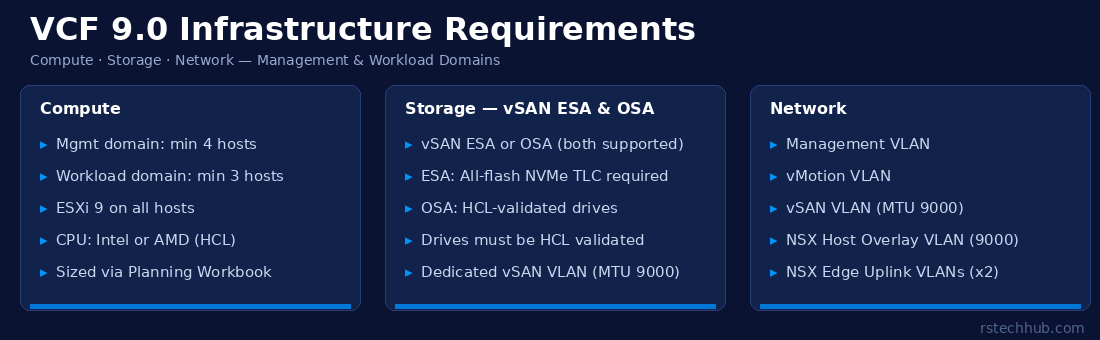
VCF 9.0 changed the deployment model significantly, the VCF Installer now handles most of the heavy lifting, and most components are deployed through VCF Installer and VCF Operations workflows rather than standalone OVA deployments. That shift makes the pre-deployment requirements check more important, not less. If the hardware doesn’t meet the spec, the automated workflows will hit problems that can be harder to diagnose than a straightforward manual deployment failure.
When I was spec’ing out my first VCF 9.0 lab, I got the NIC requirement wrong on the first pass. One uplink, no bonding. It worked fine right up until it didn’t. Don’t make that mistake in production.
Management Domain vs. Workload Domain: Why They’re Different
The management domain is the minimum required block for a VCF instance. It runs vCenter, NSX Manager, VCF Operations, and the other management components alongside your management workloads. It’s carrying the weight of the platform itself, which is why the hardware bar is higher than for a workload domain.
Workload domains are where your actual VM workloads run. You can create multiple workload domains in a VCF instance, each with their own vCenter and cluster, managed by the same central VCF Operations instance. The minimum host count is lower because they don’t need to host management appliances on top of workload VMs.
Compute Requirements
Management Domain
The management domain requires a minimum of 4 ESXi hosts. This isn’t arbitrary, vSAN’s default protection policy in the management domain requires enough hosts to tolerate at least one failure, and 4 is the practical minimum for doing that with useful storage efficiency.
| Requirement | Management Domain |
|---|---|
| Minimum hosts | 4 |
| CPU | Intel Ice Lake (3rd Gen Xeon Scalable) or newer / AMD EPYC 7003 series or newer, 12-core minimum per socket; verify on the Broadcom Compatibility Guide |
| RAM per host | Size for management VMs + workload headroom, The 32 GB floor is real for small deployments. In practice though, I’ve never seen a production workload sit comfortably at 32 GB. Plan for 128 GB minimum if you’re running anything meaningful. 32 GB per host is the vSAN ESA architectural minimum. Production vSAN ESA deployments require a minimum of 128 GB per host per Broadcom guidelines. Use the VCF Planning Workbook for environment-specific sizing. Note: Advanced capabilities such as NVMe Memory Tiering and running VCF management workloads (VCF Operations, VCF Automation) require significantly higher memory, plan for 256 GB to 512 GB or more per host for enterprise deployments using these features. |
| Hypervisor | ESXi 8 (deployed and managed by VCF Installer) |
| NSX | NSX 4.x (required; deployed and managed through VCF Operations) |
| vSAN type | vSAN ESA or vSAN OSA, both are supported in VCF 9.0. ESA requires NVMe TLC devices per storage pool. Refer to the Broadcom Compatibility Guide for validated configurations. |
Workload Domain
Workload domains have more flexibility. A minimum of 3 ESXi hosts is required to form a production vSAN cluster. For nested lab environments, single-node vSAN ESA configurations are possible but unsupported for production use. Hosts must still be on the Broadcom Compatibility Guide for your chosen VCF version, the HCL applies to all domains, not just management.
| Requirement | Workload Domain |
|---|---|
| Minimum hosts | 3 |
| CPU | Intel Ice Lake (3rd Gen Xeon Scalable) or newer / AMD EPYC 7003 series or newer, 12-core minimum; verify on Broadcom Compatibility Guide |
| Hypervisor | ESXi 8 |
| vSAN type | vSAN ESA or vSAN OSA, both are supported. Validate your storage configuration against the Broadcom Compatibility Guide. |
| Max workload domains | Refer to VMware Configuration Maximums at configmax.broadcom.com |
Storage Requirements
vSAN OSA vs ESA. Choosing the Right Architecture
VCF 9.0 supports both vSAN storage architectures. The right one depends on your hardware.
vSAN OSA (Original Storage Architecture) uses the traditional disk group model: each disk group has a cache flash device and one or more capacity devices (magnetic or SSD). OSA supports SAS/SATA SSDs for all-flash configurations, or hybrid configurations with NL-SAS spinning disks for capacity. If you’re upgrading from an older VCF or vSAN deployment and your existing hardware meets the OSA requirements, this path remains supported.
vSAN ESA (Express Storage Architecture) replaces disk groups with a single storage pool per host. There’s no separate cache tier, all NVMe TLC devices contribute to both caching and capacity. ESA requires NVMe TLC storage and at least 128 GB of host memory. It delivers higher performance and storage efficiency, and it’s the recommended architecture for new deployments where hardware supports it.
Regardless of which architecture you choose, all drives and controllers must be validated on the Broadcom Compatibility Guide. Using unvalidated hardware is a common source of support issues in production environments. Check the guide before you order.
Network Requirements
VLANs Required
VCF 9.0 uses a multi-VLAN network model. Each VLAN serves a specific traffic type, and they need to be pre-configured on your physical switches before the VCF Installer runs. The installer will validate network connectivity as part of the pre-check sequence, failed network checks stop the deployment before anything gets deployed.
| Network | Purpose | Notes |
|---|---|---|
| Management | Host management, vCenter, NSX Manager, VCF Operations | Required for both management and workload domains |
| vMotion | Live VM migration between hosts | Separate from management for performance isolation |
| vSAN | vSAN storage traffic between hosts | Dedicated network strongly recommended; MTU 9216 (jumbo frames) |
| NSX Host Overlay | Geneve tunnel traffic between hypervisors | MTU 9216 required |
| NSX Edge Uplinks | North-south traffic from NSX Edge nodes | Typically 2 VLANs for redundant uplinks |
Physical NIC Requirements
VCF 9.0 requires two bonded physical NICs per host for high availability, configured as redundant uplinks to a vSphere Distributed Switch (VDS) for management, vMotion, and vSAN traffic failover. In practice, most deployments use two or more 25GbE ports. 10GbE is supported but puts more pressure on bandwidth, especially once vSAN and NSX overlay traffic are running simultaneously. For any environment planning to run heavy storage workloads or large numbers of VMs, 25GbE is the more realistic baseline.
NIC models also need to be on the Broadcom Compatibility Guide. Not every 25GbE adapter supports the specific features VCF relies on, in particular, NSX requires NIC drivers that support the features needed for distributed packet processing. Check compatibility before you rack anything.
Validated Server Hardware (Broadcom Compatibility Guide)
🔗 Check the Broadcom Compatibility Guide First
The definitive source for validated server hardware is the Broadcom Compatibility Guide. Filter by: Product = VMware Cloud Foundation, then select Version 9.0. The guide shows validated configurations per server model, including supported CPU generations, NIC models, and any known restrictions.
The major server platform families that have historically had broad VCF compatibility coverage include:
Dell Technologies. PowerEdge R-series rack servers (R650, R750, R760 and similar generations) are commonly deployed with VCF. Specific models need HCL verification for VCF 9.0.
HPE. ProLiant DL series (DL360, DL380, DL560 and Gen10/Gen11 variants) appear frequently in VCF validated configurations. Validate the specific model and generation against the HCL for VCF 9.0.
Cisco. UCS B-Series blade servers and UCS X-Series have VCF validated configurations. Cisco publishes CVDs (Cisco Validated Designs) that cross-reference the Broadcom HCL for specific configs.
Lenovo. ThinkSystem SR series (SR650, SR630, SR860 and V3 variants) are represented on the VCF HCL.
Supermicro and others. Some Supermicro platforms appear on the HCL, particularly for vSAN-focused deployments. Smaller OEMs should be verified carefully, the HCL is the only authoritative source.
Validated Storage Hardware
🔗 vSAN Drive Compatibility (OSA and ESA)
For storage validation, use the Broadcom Compatibility Guide. For vSAN ESA, filter for vSAN ESA compatible drives, the guide lists validated NVMe TLC drives with specific firmware versions. For vSAN OSA, filter for vSAN and look for validated SAS/SATA SSD and HDD configurations. Only drives on this list are supported in production, regardless of architecture.
vSAN ESA is designed around NVMe TLC drives, and the performance difference compared to OSA on SAS SSDs is significant for write-intensive workloads, database transaction logs, AI inference, and similar latency-sensitive applications benefit most. For environments where storage capacity matters more than peak performance, vSAN OSA with validated SAS SSDs remains a viable option. In either case, check the specific drive model and firmware version on the HCL before ordering.
External shared storage (SAN/NAS) is supported in VCF 9.0 for workload domains in specific configurations, but the management domain must use vSAN. If you’re planning external storage for workload domains, validate the storage array, protocol (FC, iSCSI, NFS), and HBA/NIC against the relevant Broadcom storage compatibility sections separately.
The Planning Workbook
Broadcom publishes a VCF Planning and Preparation Workbook (Excel) that walks through environment sizing, IP addressing, VLAN planning, and prerequisite checklists for both management and workload domains. It’s available from the VCF 9.0 Planning and Preparation documentation. If you’re doing a fresh deployment, fill this in before touching the VCF Installer. It forces you to think through network design, IP addressing, and DNS before the installer asks for it, which is much better than discovering a planning gap mid-deployment.
📚 References
- Broadcom Compatibility Guide (HCL), compatibilityguide.broadcom.com
- Hardware Requirements for vSAN (VCF 9.0). Broadcom TechDocs
- VCF 9.0 Planning and Preparation. Broadcom TechDocs
- Paths to Building VCF 9.0.x Environments. Broadcom TechDocs
- VMware Configuration Maximums, configmax.broadcom.com
- VCF 9.0 Release Notes. Broadcom TechDocs