VCAP-VCF Storage Practice Scenarios and Study Reference
This is the companion post to I Passed the VCAP-VCF Storage Exam: What to Expect and How to Prepare. That post covers the exam breakdown, what came up, and where to focus your study time. This one is the hands-on study reference: storage role classifications, a decision matrix, and practice scenarios in the style of the 3V0-23.25.
Principal vs Supplemental Storage in VCF 9.0
Since Broadcom rebranded this to a VCF-aligned exam, it’s worth understanding the distinction between Principal and Supplemental storage, because the exam tests it.
Principal storage is what you use to bootstrap a workload domain cluster. For VCF, that means vSAN. You can’t bring up a standard VCF management or workload domain without it. Supplemental storage is anything you mount after the cluster is already running: NFS datastores, VMFS on FC or iSCSI, that sort of thing. In my lab, the TrueNAS NFS share I use is supplemental storage attached to an already-running vSAN cluster.
The part that trips people up is SPBM. Storage policies span across both principal and supplemental storage. A VM can have its home objects on vSAN and a secondary VMDK on an NFS datastore, and SPBM governs placement for both. When the exam gives you a scenario with mixed storage backends, it’s testing whether you understand that policy enforcement doesn’t stop at the vSAN boundary.
VCF 9.0 Storage Decision Matrix
I found it useful to have a mental quick-reference for which storage technology fits which VCF design constraint. Here’s a simplified version of what I kept in my head going into the exam:
Technology
VCF 9.0 Role
Ideal Use Case
Key Exam Architecture Trap
vSAN ESA
Principal (Mgmt & Workload)
High-performance NVMe hardware layouts
Strictly thin-provisioned and log-structured.
vSAN OSA
Principal (Workload Only)
Legacy cache and capacity hardware setups
Cache drive failure drops the entire disk group.
NFS 4.1
Principal or Supplemental
Multi-cluster enterprise file sharing
Supports session trunking unlike legacy NFS 3.
vVOLs
Principal or Supplemental
VM-level storage array policy offloading
VASA provider failure halts all management tasks.
Fibre Channel
Supplemental Only
Existing enterprise block SAN systems
Single-initiator/single-target zoning is mandatory.
This isn’t exhaustive, but it covers the scenarios I saw most frequently on the exam.
Sample Scenario Question
To give you a feel for what the exam actually asks, here’s a scenario in the same style. This isn’t a real exam question, but it mirrors the kind of reasoning you’ll need.
Practice Scenario ALUA Multipathing & PSP Configuration
This is not a real exam question. It’s an example I’ve written to illustrate the style of scenario-based reasoning you’ll encounter on the 3V0-23.25.
Scenario
A company has a two-site VCF deployment connected over 10Gbps links. They use an active-passive SAN array with ALUA for their supplemental VMFS datastores. Administrators report intermittent latency spikes during peak hours. The current PSP is set to Fixed, and no custom SATP rules are configured.
Which two changes would most effectively address the latency issue?
A Change the PSP to Round Robin to distribute I/O across available paths
B Add a custom SATP rule to set Round Robin as the default for this array model
C Switch the array to active-active mode at the storage layer
D Increase the IOPS threshold on the Round Robin PSP to 10000
Explanation
Fixed PSP sends all I/O down a single path, creating a bottleneck. Round Robin distributes the load. The SATP rule ensures this applies automatically to all hosts that discover the array, rather than requiring per-host manual configuration. Option C might help, but it’s a storage-side change that may not be possible on all arrays. Option D would actually reduce path switching frequency, making things worse.
Practice Scenario vSAN Stretched Cluster & Witness Placement
This is not a real exam question. It’s an example I’ve written to illustrate the style of scenario-based reasoning you’ll encounter on the 3V0-23.25.
Scenario
An organisation runs a vSAN stretched cluster across two data centre sites (Site A and Site B) with a witness host deployed in a third location. Site B suffers a complete network outage, losing connectivity to both Site A and the witness. VMs on Site B have a site affinity policy set to “Site B preferred.” The vSAN storage policy uses FTT=1 with a stretch cluster configuration.
What happens to the VMs that were running on Site B?
A The VMs continue running on Site B using locally cached data until connectivity is restored
B The VMs on Site B become inaccessible because Site B has lost quorum (no connectivity to witness or Site A)
C vSphere HA restarts the VMs on Site A automatically regardless of site affinity settings
D The witness takes over as the active data node and serves the VMs directly
Explanation
vSAN stretched clusters use a quorum model. Each component vote is distributed across Site A, Site B, and the witness. When Site B loses connectivity to both the witness and Site A, it loses majority quorum and can no longer serve I/O. The VMs on Site B become inaccessible. Site affinity is a preference, not a guarantee of continued operation during a partition. Option A is wrong because vSAN doesn’t cache data locally for continued operation without quorum. Option C is partially right in that HA will attempt restarts on Site A, but only after the isolation response triggers, and it depends on HA configuration, not “automatically regardless.” The witness never stores VM data (Option D), it only holds witness components for quorum decisions.
Practice Scenario Layer 3 Inter-Site Networking & Routing Configuration
This is not a real exam question. It’s an example I’ve written to illustrate the style of scenario-based reasoning you’ll encounter on the 3V0-23.25.
Scenario
A company is deploying a vSAN stretched cluster across two data centre sites connected via Layer 3 routed links. After initial configuration, hosts at Site B cannot join the vSAN cluster. Site A hosts are fully operational. An administrator confirms basic connectivity between sites using ping from the ESXi console, and latency is well within the supported 5ms RTT threshold. The vSAN VMkernel adapters are on separate subnets at each site with no custom gateway or static route configured.
What is the most likely cause of the cluster formation failure?
A The multicast TTL is set to 1 and packets are expiring at the first router hop
B Missing static routes or gateway configuration on the vSAN VMkernel adapters, causing vSAN unicast traffic to route via the management interface and silently drop
C The inter-site routers are blocking multicast traffic required for vSAN node discovery
D The vSAN datastore requires all hosts to share the same Layer 2 broadcast domain
Explanation
Since vSAN 6.6 (2017), all cluster communication runs over unicast. Multicast is legacy and deprecated, so Options A and C are red herrings designed to catch anyone studying from outdated material. In a Layer 3 stretched deployment, each site’s vSAN VMkernel adapters sit on different subnets. Without explicit static routes or a gateway configured on the vSAN vmk interface via ESXCLI, traffic destined for the remote site’s vSAN subnet falls back to the default management gateway, where it gets dropped or routed asymmetrically. The reason basic ping works is subtle: a bare ping from the ESXi shell uses the management stack by default. You’d need vmkping --interface vmkX bound to the vSAN VMkernel to actually test the right path. Option D is wrong because vSAN fully supports Layer 3 routed deployments.
Practice Scenario vSAN ESA Object Space Reservation & Thin Provisioning
This is not a real exam question. It’s an example I’ve written to illustrate the style of scenario-based reasoning you’ll encounter on the 3V0-23.25.
Scenario
An infrastructure architect is designing a VCF 9.0 workload domain using vSAN ESA with high-performance NVMe drives. A critical transactional database workload requires a high-performance storage profile. The architect assigns a storage policy where Object Space Reservation (OSR) is configured to 100% (Thick Provisioned) to minimise any latency penalty associated with dynamic block allocation during high-volume database writes. During post-deployment sizing audits, administrators notice that space consumption metrics show all virtual disks under this policy are reporting as dynamically scaling thin disks.
Which statement correctly explains this architectural behaviour?
A vSAN ESA does not honour Object Space Reservation because all virtual disks are natively log-structured and strictly thin-provisioned
B The vSAN storage policy was corrupted during deployment and must be manually reapplied via ESXCLI on each individual ESXi host
C Object Space Reservation in ESA forces data blocks to be zeroed out instantly, meaning the array is experiencing an invisible space reclamation delay
D The backing hardware lacks the advanced VASA 3.0 provider required to translate thick-provisioned policies down to the NVMe tier
Explanation
Unlike legacy vSAN OSA, which physically pre-allocates blocks when OSR is set to 100%, vSAN ESA’s file system is log-structured and strictly thin-provisioned. Setting OSR to 100% in ESA doesn’t thick-provision physical disk blocks. It reserves logical namespace capacity in the storage pool to guarantee future growth space. The dynamic allocation latency that thick provisioning was designed to avoid on OSA doesn’t exist in the same way under ESA’s architecture, making old “thick provisioning for performance” logic obsolete. This is a common architectural trap on the exam: applying OSA assumptions to ESA. Options B, C, and D represent common administrative misunderstandings about how the underlying storage layer works in ESA.
Practice Scenario vVOLs & VASA Provider Control-Plane Failures
This is not a real exam question. It’s an example I’ve written to illustrate the style of scenario-based reasoning you’ll encounter on the 3V0-23.25.
Scenario
An enterprise environment uses an external SAN array serving supplemental storage via Virtual Volumes (vVOLs) to a VCF workload domain. Due to a severe top-of-rack switch misconfiguration, both redundant VASA (vSphere Storage APIs for Storage Awareness) Providers for the storage array lose network connectivity to vCenter and the ESXi hosts. The underlying physical storage network fabric and Protocol Endpoints (PEs) remain completely unaffected and fully routable.
What is the immediate impact of this VASA Provider outage on the virtual machine environment?
A All running virtual machines on the vVOL datastore instantly crash because the primary data I/O path is broken
B Existing virtual machines continue to run and process storage I/O normally, but administrative actions like provisioning, cloning, snapshotting, or changing SPBM storage policies fail
C Storage DRS immediately triggers an automated, non-disruptive Storage vMotion of all running workloads to a fallback vSAN datastore
D The ESXi hosts immediately re-route I/O traffic through legacy software iSCSI initiators using default SATP multipathing rules
Explanation
This scenario tests your understanding of the separation between the storage control plane (managed by the VASA Provider) and the data plane (managed by Protocol Endpoints). PEs handle the actual block-level traffic, so running VMs suffer no I/O disruption, ruling out Option A. However, the VASA Provider handles all metadata and SPBM policy enforcement. When VASA goes offline, the control plane freezes, preventing any configuration updates, snapshot creation, or new deployments. Option C is wrong because Storage DRS cannot autonomously migrate workloads off a vVOL datastore in response to a VASA outage. Option D fabricates a failover mechanism that doesn’t exist.
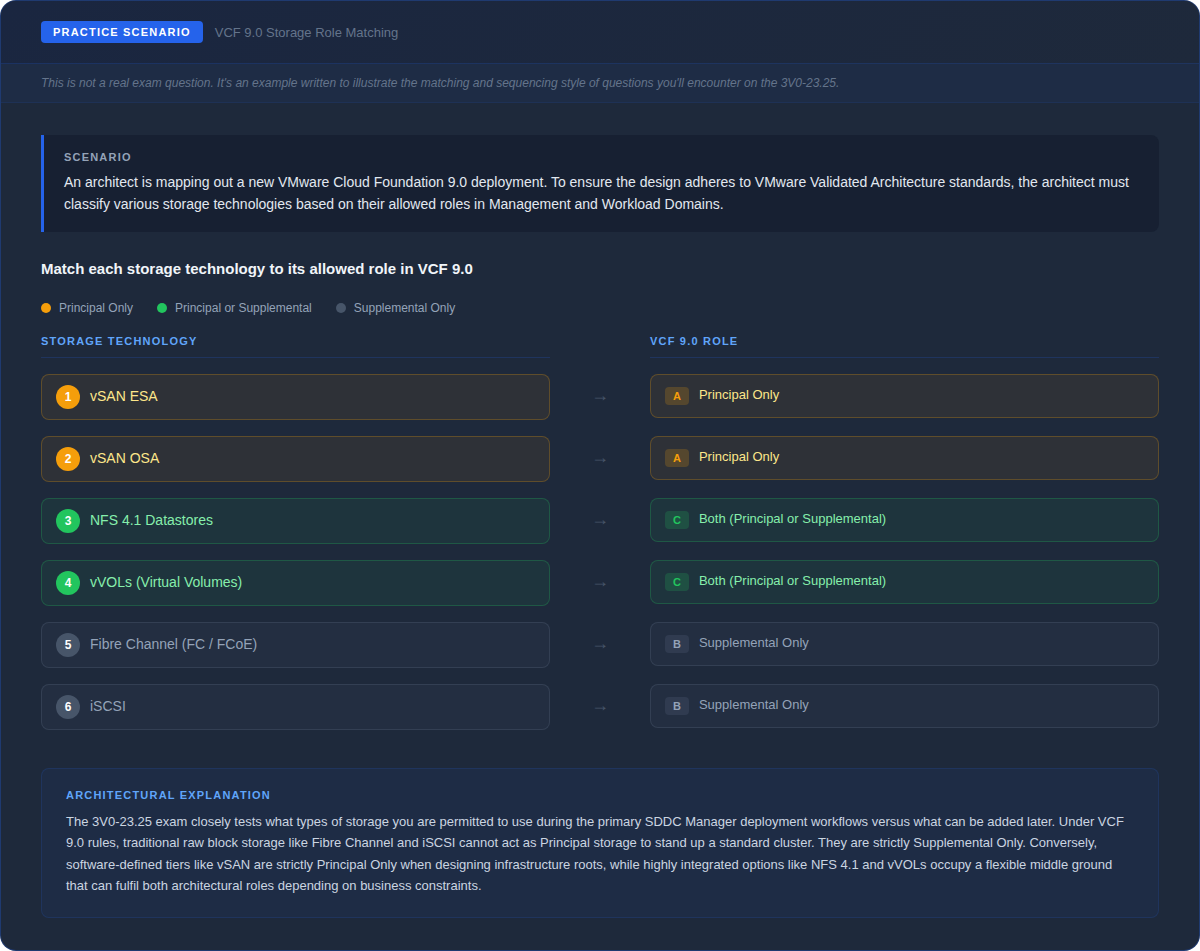
Practice Scenario: VCF 9.0 Storage Role Matching
The exam also includes matching and sequencing questions. Here’s an example of how those look, where you need to map storage technologies to their allowed VCF 9.0 roles:
If that kind of multi-layered reasoning feels comfortable, you’re in good shape for the exam.