
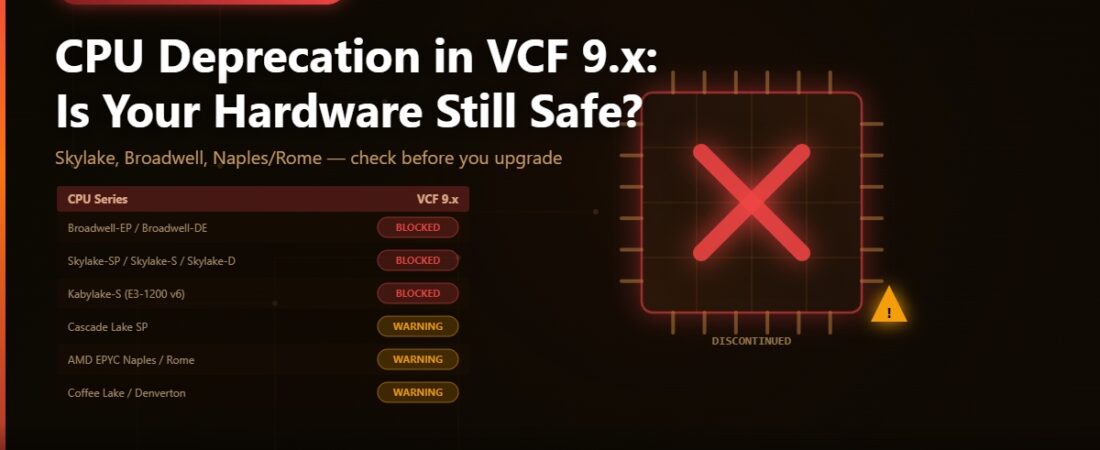
One of the less glamorous parts of planning a VCF upgrade is checking whether your hardware will actually survive the jump. I’ve had a few conversations recently with people who discovered mid-planning that their Intel Skylake-SP hosts won’t boot ESX 9.x at all — not a warning, a hard block. The VCF installer simply refuses. So I want to go through exactly what Broadcom has deprecated and discontinued in VCF 9.x, what the difference actually means in practice, and what you need to do if you’re on affected hardware.
Deprecated vs. Discontinued — The Two-Phase Model
Broadcom uses a two-phase approach to retiring CPU support. Understanding the distinction matters because the operational impact is very different.
Deprecated means the CPU is still supported in the current VCF release. The installer shows a warning during install or upgrade — “The CPUs in this host may not be supported in future VCF releases. Plan accordingly.” — but it lets you continue. Your environment will run, get patches, and be supported for the full life of the VCF 9.x release series. The deprecation warning is Broadcom telling you to start planning a hardware refresh before the next major release.
Discontinued is the hard stop. The VCF 9.x installer blocks the deployment entirely. If you try to deploy VCF 9.x or upgrade ESX to 9.x on a host with a discontinued CPU, you get an error and the process halts. There is no workaround. You cannot run VCF 9.x on discontinued hardware.
There’s one important caveat for deprecated CPUs: the server model also needs to remain listed on the Broadcom Compatibility Guide (BCG). If your OEM hasn’t kept their server listing current on the BCG, support coverage gets murky even if the CPU itself is in the deprecated list. Worth checking your specific server model at compatibilityguide.broadcom.com before starting an upgrade project.
What’s Discontinued in VCF 9.x
These CPU families will block a VCF 9.x installation outright. If you have these in production and you’re planning to move to VCF 9.x, you need new hardware first.
Intel Broadwell-EP and Broadwell-DE (Xeon E5-2600 v4, E5-1600 v4, E5-4600 v4, E7-8800/4800 v4, Xeon D-1500 series). A lot of 2016-era server deployments landed on Broadwell-EP. These are fully blocked in VCF 9.x.
Intel Skylake-SP (Xeon Platinum 8100, Gold 6100/5100, Silver 4100, Bronze 3100). This is probably the one that’s going to catch the most people off guard. Skylake-SP was a popular choice for VCF 5.x and early 6.x deployments. A three-socket Skylake-SP cluster from 2018 that’s been humming along through upgrades hits a wall at VCF 9.x. Skylake-D (Xeon D-2100) and Skylake-W (Xeon W-2100) share the same CPUID and are blocked too.
Intel Skylake-S (Xeon E3-1200 v5, E3-1500 v5) and Kabylake-S (Xeon E3-1200 v6). Edge and small-footprint deployments on these hit the same hard block.
What’s Deprecated in VCF 9.x — Still Works, Plan Your Exit
These CPUs run fine in VCF 9.x but show a warning during install and upgrade. You’re supported through the 9.x lifecycle. Plan to replace before VCF 10.x arrives.
Intel Cascade Lake SP/Refresh (Xeon Platinum 8200, Gold 6200/5200, Silver 4200, Bronze 3200). This is where a lot of current VCF 8.x environments sit. You can upgrade those to VCF 9.x — Cascade Lake is still supported. But the deprecation warning means the clock is running. Start building the business case for Ice Lake or Sapphire Rapids hosts now.
AMD EPYC Naples (7001 series) and EPYC Rome (7002/7Fx2 series). If you were an early EPYC adopter in your VCF environment, Naples and Rome are deprecated in 9.x. Milan (7003) and Genoa (9004) are fully supported. This is a good time to evaluate the EPYC Genoa vSAN ESA story for your next refresh cycle.
Intel Coffee Lake (Xeon E-2100, E-2200 series) and Denverton (Atom C3000). These appear in edge compute and ROBO deployments. They run in VCF 9.x with warnings.
What This Means for Your Upgrade Planning
If you’re on Broadwell-EP or any Skylake variant, the path is clear: you need new hardware before you can move to VCF 9.x. Running VCF 8.x on those hosts in extended support while you plan a refresh is the realistic path for most environments in this situation.
If you’re on Cascade Lake or AMD Rome, you have time. VCF 9.x will run on those CPUs and you’ll be supported through the 9.x lifecycle. The deprecation warning is your signal to plan a refresh before 10.x, not a reason to panic now.
For net-new VCF 9.x builds, the safe choices are Intel Ice Lake (Xeon 3rd Gen Scalable), Sapphire Rapids (4th Gen), Emerald Rapids, and AMD EPYC Milan, Genoa, or Bergamo. All fully supported, no deprecation flags.
One practical note: if you’re running a mixed-CPU cluster where some hosts are on deprecated hardware and others are on fully supported CPUs, ESX 9.x will install on all of them but the deprecated hosts will generate warnings. Make sure your cluster’s EVC mode is set appropriately — you don’t want the deprecated-CPU hosts setting the baseline and limiting features on the whole cluster.
Deprecated NICs Worth Knowing Before You Upgrade
The CPU list isn’t the only hardware story in VCF 9.1. A few network adapters moved into the deprecated column in VCF 9.1 too. Cisco VIC 1200 and 1300 series are deprecated due to lack of Enhanced Data Path (EDP) support. Marvell/Aquantia Atlantic NICs — the USB and PCIe 10GbE adapters common in home lab builds — are deprecated. AMD Solarflare 8000 and X2 series Ethernet adapters are also deprecated. None of these are hard blocks yet, but if you’re speccing new hosts for VCF 9.x, avoid these adapter families.
How to Check Your Hardware
The authoritative source is KB 82794 on knowledge.broadcom.com, which has the full CPU tables with raw CPUIDs. The Broadcom Compatibility Guide at compatibilityguide.broadcom.com lets you search by server model to confirm BCG listing status. If your server model isn’t listed, contact your OEM — they need to submit it for listing, and without that, your support coverage is uncertain even for deprecated CPUs.
Before I touch LCM bundles on any environment, I run a quick PowerCLI check across all ESXi hosts to pull CPU model strings. It takes two minutes and saves a lot of surprises when the installer flags something at 11pm during a change window.