
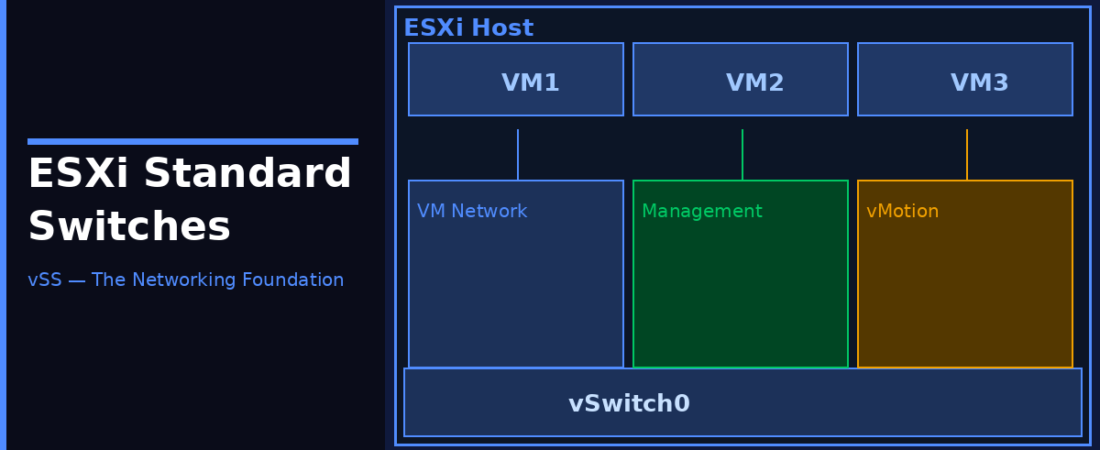
If you’ve spent any time working with ESXi hosts, you’ve run into virtual switches whether you realised it or not. The first time you deployed a VM and it just… had network access, that was a vSphere Standard Switch (vSS) doing its job quietly in the background. I want to dig into how these things actually work, because understanding vSS properly makes everything else in VMware networking click into place.
What Is a vSphere Standard Switch?
A vSphere Standard Switch (vSS, often called a vSwitch) is a software-defined switch that lives entirely within the ESXi hypervisor. It handles all Layer 2 traffic between virtual machines on the same host, and bridges that traffic out to the physical network through physical NICs (called uplinks or vmnic adapters).
The key thing to understand: a vSS is host-local. Every ESXi host manages its own vSS configuration independently. If you have 10 hosts and want the same network layout on each, you have to configure each one individually. That’s the main trade-off with standard switches versus distributed switches, more control per host, more manual work at scale.
When you install ESXi, a default switch called vSwitch0 is created automatically. It’s pre-wired to your first physical NIC (vmnic0) and has a Management Network port group on it. This is how your host talks to the outside world from day one.
The Building Blocks
Uplinks (Physical NICs)
These are the physical network adapters on the host, vmnic0, vmnic1, vmnic2, etc. You assign one or more of these to a vSS as uplinks. The switch uses these to send and receive traffic to and from the physical network. No uplinks means the VMs on that switch can only talk to each other on the same host, which is sometimes intentional for isolated lab networks.
Port Groups
A port group is a labelled collection of ports on the vSwitch that share the same network policy. Think of it like a VLAN or a network segment, but defined in software. Your VMs connect to port groups, not directly to the vSwitch. You can have multiple port groups on the same vSwitch, for example, a “Production” port group and a “DMZ” port group on vSwitch1, with different VLAN IDs and security policies.
VMkernel Ports (vmk)
VMkernel ports are special interfaces used by the ESXi host itself rather than by VMs. They handle management traffic, vMotion, iSCSI, NFS, and vSAN traffic. You assign specific services to each VMkernel port. For example, vmk0 is typically your management interface, and you might add vmk1 dedicated to vMotion to keep that traffic separate.
Configuring a vSS
In the vSphere Client, navigate to your ESXi host → Configure → Networking → Virtual Switches. Hit Add Networking to create a new vSwitch or add port groups to an existing one.
From the ESXi Shell or SSH, you can do the same with esxcli:
# Create a new standard switch
esxcli network vswitch standard add --vswitch-name=vSwitch1

# Add an uplink (physical NIC) to the switch
esxcli network vswitch standard uplink add --vswitch-name=vSwitch1 --uplink-name=vmnic1

# Add a port group to the switch
esxcli network vswitch standard portgroup add --vswitch-name=vSwitch1 --portgroup-name=Production

# Set a VLAN ID on the port group
esxcli network vswitch standard portgroup set --portgroup-name=Production --vlan-id=100
Security Policies
- Promiscuous Mode. When enabled, a VM’s NIC can see all traffic on the port group, not just frames addressed to it. Needed for network monitoring tools and some firewall VMs.
- MAC Address Changes. Controls whether the hypervisor allows a VM to change its MAC address from what was assigned at creation. Reject this unless you have a specific reason.
- Forged Transmits. Controls whether the hypervisor will forward frames where the source MAC doesn’t match the VM’s assigned MAC. Reject it by default.
Traffic Shaping
vSS supports outbound (egress) traffic shaping on port groups. You can set Average Bandwidth (sustained rate in Kbps), Peak Bandwidth (max burst rate), and Burst Size (max data in a burst). Note: traffic shaping on a standard switch applies to outbound (egress) traffic from VM port groups. For VMkernel port groups handling host traffic like vSAN replication or backups, shaping governs ingress instead, so keep that in mind when throttling those streams. For bidirectional shaping, you need a Distributed Switch.
MTU and Jumbo Frames
By default, vSS uses an MTU of 1500 bytes. If you’re running iSCSI, NFS, or vSAN, consider bumping this to 9000 for jumbo frames. Every component in the path needs to support the same MTU: the vSwitch, the VMkernel port, the physical switches, and the storage array.
When to Use vSS vs VDS
Standard switches work well in smaller environments, a handful of hosts, simple flat networks, or lab setups. Once you start scaling beyond a few hosts or need LACP, Network I/O Control, or per-port policies, the Distributed Switch (VDS) is the right tool. VDS capabilities are now bundled standard inside both VMware vSphere Foundation (VVF) and VMware Cloud Foundation (VCF) subscription packages.
Quick Reference
- Default switch:
vSwitch0. MTU: 1500 (change to 9000 for jumbo frames) - VLAN ID 0 = EST mode (no tagging)
- VLAN ID 1–4094 = VST mode (switch tags frames)
- VLAN ID 4095 = VGT mode (guest tags its own frames)
- Max uplinks per vSS: 8. Max port groups per vSS: 256