
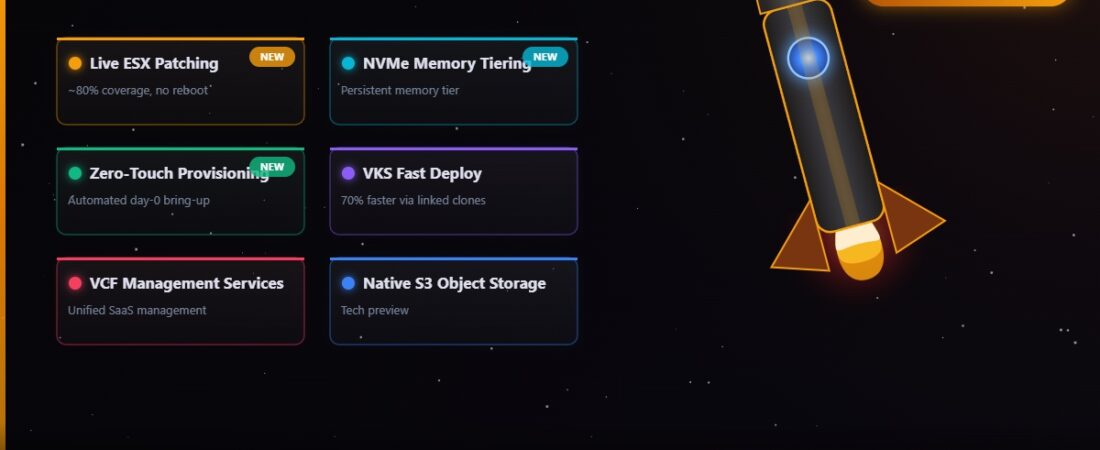
VMware Cloud Foundation 9.1 went GA on 12 May 2026, roughly eleven months after VCF 9.0 landed. I’ve been working through the release notes and TechDocs since day one and there’s more here than the usual maintenance release. A handful of these features are things the community has been asking for across several release cycles. A couple of them are genuinely new territory for the platform.
I’ll go through the features that matter most, then put the full BOM at the end so you have the build numbers to verify against after an upgrade.
Live Patching for ESX — The One That Changes Maintenance Windows
This is the headline feature for most of the operations-focused people I’ve talked to about 9.1. Live patching applies patches directly to the running ESX kernel in memory. The hosts don’t enter maintenance mode. VMs keep running. No vMotion, no reboot, no maintenance window for up to 80% of patches.
There are requirements. Live patching is only available on TPM 2.0-enabled hosts. If your hardware doesn’t have a TPM, you’re still on the traditional rolling reboot path. Most servers from 2019 onwards have TPM 2.0, but check your hardware before building expectations around this feature.
The “up to 80% of patches” coverage means not every patch can be applied live — patches that touch firmware, certain kernel subsystems, or VIBs that require a full reload still need a reboot. But if 80% of your patch cycles can happen without a maintenance window, that’s a material change in how you plan patching operations, particularly for environments with strict uptime requirements.
Live patching is managed through LCM in SDDC Manager. The workflow looks the same as a standard patch — download bundles, run pre-checks, apply — but for TPM-enabled hosts, LCM applies patches in live mode automatically where the patch supports it.
Enhanced NVMe Memory Tiering
VCF 9.1 extends the NVMe memory tiering capability that was introduced in earlier releases. The ESX hypervisor now tiers active VM memory pages to DRAM and automatically offloads cold pages to local NVMe storage. The practical effect is that your effective memory capacity per host expands beyond your installed DRAM capacity — at some cost to latency when cold pages get accessed, but with software-based mirroring added in 9.1 to protect the NVMe tier data.
9.1 also adds a cost savings analysis tool that helps you model how much NVMe tiering could defer DRAM purchases in your environment. This is a capacity planning feature as much as a runtime feature — the pitch is that you can run more VMs per host at a lower DRAM cost by letting NVMe absorb the cold memory footprint.
For most mixed workloads, this is worth evaluating. Memory is often the constraining factor in VM density calculations, and if a significant portion of your VM memory is cold at any given time, tiering to NVMe makes that idle DRAM capacity available without adding hardware.
vSphere Elastic Provisioning (Zero Touch)
Zero-touch host provisioning is exactly what it sounds like. You rack a new ESX host, it boots via the network (UEFI HTTP/S), and VCF automatically images it, configures it, and adds it to the appropriate cluster. No manual ESX installation, no USB drive, no someone in the data centre running through an install wizard.
This has been achievable with third-party tools for a while, but VCF 9.1 bakes it in natively through the VCF Installer component. The imaging configuration is managed through SDDC Manager, which generates the boot configuration that the new host’s UEFI picks up over HTTP/S.
For environments that regularly expand clusters or add new workload domains, this changes the labour model significantly. Adding ten hosts used to mean someone touching ten hosts. With zero-touch, it means someone configuring the SDDC Manager provisioning template once and then racking hardware.
Extended vSAN Deduplication and Compression
vSAN 9.1 broadens inline deduplication and compression support across more cluster types and workload profiles than were previously covered. Two specific improvements are worth calling out.
First, deduplication now works for data-at-rest encrypted clusters. Previously, enabling vSAN encryption disabled deduplication because dedupe requires plaintext comparison of block content, which isn’t possible when data is encrypted at write time. vSAN 9.1 solves this with a dedupe-then-encrypt approach that applies deduplication before encryption in the write path, preserving space savings while maintaining encryption.
Second, compression algorithms have been updated to improve the ratio on workload types that previously compressed poorly, including certain database workloads. The practical impact will vary depending on your data patterns, but environments running Oracle or SQL Server on vSAN ESA should see better effective capacity utilisation after upgrading to 9.1.
VCF Management Services (VCFMS)
This is one of the more significant architectural shifts in 9.1, and it matters whether you’re doing a fresh deployment or upgrading from 9.0.x. VCF 9.1 introduces the VCF Management Services Cluster (VCFMS) — a managed Kubernetes cluster that consolidates multiple previously separate management appliances and services into a single, unified runtime.
If you’ve been running VCF 9.0, you already saw the start of this with the Identity Broker (vIDB) cluster. VCFMS takes that approach and expands it significantly. Starting in 9.1, this cluster is mandatory for all VCF deployments — no exceptions.
What Runs Inside VCFMS
- VMware Identity Broker (vIDB) — If you’re upgrading from 9.0, the existing vIDB cluster gets migrated into VCFMS and the old cluster is shut down.
- Centralised Software Depot — Previously every component (NSX, vCenter, SDDC Manager) had its own software repository. VCFMS hosts a single depot that covers updates for all VCF components.
- VCF Lifecycle Manager — The standalone LCM appliance that existed before 9.1 is decommissioned as part of the upgrade. Its functionality moves into the services cluster.
- SaltStack — VMware’s configuration management engine is now deployed by default as part of VCFMS. It handles declarative state management across your VCF environment.
- VCF Operations for Logs — Log management (previously a dedicated vRLI cluster) now runs inside VCFMS instead of as a separate appliance deployment.
Networking Requirements
VCFMS has specific IP and DNS requirements you need to plan for before deploying or upgrading. You need a minimum of 12 contiguous IP addresses for the cluster worker nodes, plus 4 FQDNs for the cluster services. These can come from your existing management network or a dedicated services network — the latter being the preferred approach for production environments.
Greenfield vs Upgrade
For new VCF 9.1 deployments, the VCFMS cluster is provisioned automatically during bring-up. For upgrades from 9.0.x, deploying VCFMS is a required step in the upgrade workflow — you’ll do it through SDDC Manager before the rest of the upgrade proceeds. You don’t need to know Kubernetes to manage it; everything is exposed through VCF Operations Fleet Management and the standard Lifecycle workflows.
VKS and VM Fast-Deploy
Deploying Kubernetes clusters via the vSphere Kubernetes Service (VKS) in 9.0 was not fast. In environments with large node counts or many cluster deployments, the provisioning time added up. VCF 9.1 uses linked clone technology to significantly cut the time for both VKS cluster deployments and VM cluster provisioning — Broadcom quotes up to 70% faster provisioning in the release notes.
Linked clones mean the initial clone of a base image is near-instant rather than requiring a full disk copy. For workloads where you’re frequently creating and destroying clusters (dev/test environments, CI/CD pipelines, ephemeral environments), this matters a lot. For stable long-running production clusters that rarely change shape, the provisioning time improvement is less relevant day-to-day but still affects how quickly you can respond when you do need to scale.
Native Object Storage (Tech Preview)
VCF 9.1 introduces an S3-compatible object storage service as a tech preview. Developers can provision S3 buckets through the self-service interface with the same guardrails IT defines for block and file storage — capacity quotas, access policies, lifecycle rules — without needing a separate MinIO deployment or an external object storage platform.
Tech preview means it’s not supported for production use yet, but it’s worth enabling in a lab to understand the workflow before it goes GA. The object storage service deploys on the existing vSAN infrastructure and is managed through SDDC Manager. No separate storage nodes required.
Security: Continuous Compliance and Ransomware Recovery
Two security-focused additions in 9.1.
Continuous Compliance Enforcement extends the Advanced Cyber Compliance feature that was available in VCF 9.0 into a fully automated posture management system. Rather than running compliance checks on a schedule and remediating manually, VCF 9.1 can detect drift from your defined security baseline and automatically remediate it. This covers the VCF stack itself — ESX configuration, NSX policies, vCenter settings — and provides a unified compliance dashboard across all components.
On-premises Ransomware Recovery is a new capability that creates and manages isolated clean rooms within your existing VCF infrastructure. These clean rooms are air-gapped segments where you can restore and validate workloads after a ransomware event before bringing them back into the production environment. The workflow integrates with VCF Protection and Recovery (the component formerly known as VMware Live Recovery) and doesn’t require a separate cloud target — the isolation happens on-premises using NSX micro-segmentation to create the clean room environment.
Supervisor Services: Kubernetes and VM Service at Scale
VCF 9.1 ships a significant set of improvements to the vSphere Supervisor — the integrated Kubernetes control plane that underpins workload domains, VM Service, and the VCF Kubernetes Service. If you’re running containerised workloads or using VM Service for self-service VM provisioning, these changes are worth knowing about.
The scalability ceiling moves considerably. The Supervisor now supports up to 500 Kubernetes clusters per Supervisor cluster, alongside faster provisioning and better operational efficiency at that scale. For larger environments this removes a planning constraint that has forced awkward domain splits in the past.
VM Service gets a handful of capabilities that bring it closer to full lifecycle management. Tenants can now take, manage, and delete snapshots on their VM Service VMs via VCF Automation — something that was notably absent before. VMs can be configured with multiple network interfaces at creation time, and those network configurations can be edited during day-2 operations without redeployment. You can also define VM affinity and anti-affinity rules through infrastructure policy, which matters for HA and workload placement across zones.
There’s a new VM import path as well. If you have existing vSphere VMs that you want to bring under Supervisor management — and therefore under VM Service governance — you can now import them into a vSphere Namespace without disrupting the workload. The VCF-A VCD Migration Tool supports batch imports with a defined import order, and you can roll back mid-operation if something goes wrong. This is useful for teams migrating from traditional vSphere environments into a VCF-managed posture incrementally.
Active Directory integration for VM Service VMs is new in 9.1 as well. Tenant Admins can configure an integration that automatically domain-joins VM Service VMs at provision time, targeting a specific AD domain. That removes a post-provision configuration step that has historically fallen outside the automation boundary.
New and Integrated Supervisor Services
VCF 9.1 introduces a formal Supervisor Services layer — a set of platform capabilities that run natively within the VCF runtime fabric rather than as separately managed VMs or external products. This is arguably the most architectural change in 9.1. The idea is that common infrastructure services get consumed like Kubernetes-native resources, with lifecycle handled by SDDC Manager. Here’s what’s included.
Data and Artifacts
Regional Harbor Instance brings centralised container registry functionality directly into the Supervisor. Harbor runs as a Supervisor Service, meaning you get image storage, replication between regions, and vulnerability scanning without standing up standalone Harbor VMs. For teams running containerised workloads across multiple VCF regions, having registry replication managed by the same lifecycle tooling as the rest of the platform is a significant operational simplification.
VMware Data Services Manager lands as a Supervisor Service in 9.1, giving tenants self-service access to production-ready SQL Server, PostgreSQL, and MySQL instances. These deploy as managed database services within the Supervisor namespace, with backup, patching, and scaling handled through the DSM operator rather than manual DBA intervention. If you’ve been running databases on VM Service VMs with manual management, this replaces that workflow.
Software Depot consolidates product binaries and update repositories into a single location within the platform. Rather than pulling bundles from multiple sources, SDDC Manager and LCM pull from the depot, which can be synced from depot.vmware.com or air-gapped for environments with no internet access. This was partially available before but is now fully integrated into the Supervisor Services model.
Security and Identity
Secret Store Service provides secure credential storage within the runtime framework. Applications and services running on the Supervisor can retrieve secrets through a Kubernetes-native API without hardcoding credentials or managing external vaults manually. This slots into the same namespace-level RBAC model as the rest of the Supervisor.
Encryption Management standardises Bring Your Own Key (BYOK) operations across the platform. In 9.1 you can manage key lifecycle — rotation, revocation, audit — through a unified interface rather than configuring vSAN encryption, VM encryption, and NSX encryption independently. The integration works with external KMS providers that support KMIP.
VMware Identity Broker (vIDB) replaces the pattern of running dedicated identity VMs (vIDM appliances) for Supervisor authentication. Identity operations move into native platform services, reducing the appliance footprint and the separate lifecycle management overhead that vIDM introduced. Existing integrations with Active Directory and LDAP carry over.
Platform and Lifecycle
VKS Cluster Auto-Attach automates the lifecycle connection between VKS (VCF Kubernetes Service) clusters and the Supervisor. Previously you had to manually register clusters back into the management plane after provisioning. Auto-Attach handles that connection automatically, which matters most in environments spinning up clusters at scale or using GitOps-driven cluster provisioning.
VCF Lifecycle Manager moves its core SDDC and Aria update processing into microservices running within the Supervisor. This is an internal architecture change more than a user-visible feature, but it means LCM operations are more resilient to individual component failures and can be updated independently of the main SDDC Manager appliance.
SaltStack (Salt RaaS) becomes the default configuration management infrastructure within VCF 9.1. Salt runs as a Supervisor Service and handles configuration drift detection and remediation across the platform. This ties into the Continuous Compliance Enforcement feature — Salt is the enforcement mechanism for remediating detected drift at the OS and hypervisor configuration level.
Log and Real-Time Data unifies telemetry streaming across the environment. In 9.1, logs, metrics, and events from VCF components flow through a single telemetry pipeline that feeds both VCF Operations (formerly Aria Operations for Logs) and external SIEM or observability platforms. The streaming is configured once at the platform level rather than per-component.
Networking and VM Compute
VNA Cluster Services provides a built-in routing engine for DHCP, SNAT/DNAT, and 1:1 NAT within the Supervisor networking layer. This removes the need to configure these functions manually on external NSX components for workloads running in Supervisor namespaces. It’s part of the broader push to make workload networking self-service within namespace boundaries.
NSX Load Balancer integrates automated ingress load balancing for both the Supervisor layer and VKS clusters. When a Kubernetes Service of type LoadBalancer is created in a namespace, NSX automatically provisions a virtual server and assigns an IP from the configured pool. This replaces the previous requirement to either use an external load balancer or manually configure NSX for each cluster.
VM Service Fast Deploy — already mentioned in the VKS section above — uses linked clones to speed up Ubuntu OS deployments by around 70% compared to full clone provisioning. Worth noting here that it’s scoped to Ubuntu in this release; other guest OS templates still use the standard provisioning path.
Bill of Materials — VCF 9.1.0.0
All build numbers verified from Broadcom TechDocs as of the 9.1 GA release on 12 May 2026.
| Component | Version | Build |
|---|---|---|
| VCF Installer / SDDC Manager | 9.1.0.0 | 25371088 |
| ESX | 9.1.0.0 | 25370933 |
| vCenter Server | 9.1.0.0 | 25370922 |
| NSX | 9.1.0.0 | 25318225 |
| VCF Operations (formerly Aria Operations) | 9.1.0.0 | 25346025 |
| VCF Automation (formerly Aria Automation) | 9.1.0.0 | 25370929 |
| VCF Log Management (formerly Aria Ops for Logs) | 9.1.0.0 | 25346055 |
| Fleet Lifecycle | 9.1.0.0 | 25371109 |
| VMware Tools | 13.1.0.0 | 25294452 |
| VMware Remote Console | 13.1.0.0 | 25236164 |
| Avi Load Balancer | 32.1.1 | 25377988 |
| VMware Data Services Manager | 9.1.0.0 | 25367580 |
| VCF Protection and Recovery | 9.1.0.0 | 25367487 |
Upgrading from VCF 9.0.x
The upgrade path to 9.1 is sequential from 9.0.2.0. If you’re still on 9.0.0 or 9.0.1.0, you need to upgrade to 9.0.2.0 first before 9.1 is available as a target version in LCM. The VCF 9.1 Upgrade Planning Tool (announced by Broadcom in late May 2026) is available on the Broadcom blog and helps you map your current component versions to the correct upgrade sequence.
The upgrade process follows the same LCM workflow covered in the patching walkthrough post earlier in this series — bundles, pre-checks, sequential component upgrades. 9.1 is a full minor version bump, so expect a longer maintenance window than a patch release. Budget at least 4-6 hours for a standard management domain upgrade from 9.0.2.0 to 9.1.
Release notes and the full What’s New breakdown by component are on Broadcom TechDocs.
VMware Cloud Foundation 9.1 Release Notes — Broadcom TechDocs