
I’ve been following the VCF story for a few years now, and honestly VCF 9.0 is the first version where I think they’ve gotten the philosophy right. Previous releases (even the fairly solid 5.x line) still felt like separate products duct-taped under a common installer. SDDC Manager sat to the side, Aria was almost an afterthought, and the day-2 story was a mess of overlapping consoles. With 9.0, Broadcom has drawn a clear line and said: this is a platform, not a product collection.
I’ve been running VCF in some form since version 4.x. This release feels different. Not in a marketing way. In the way where you deploy it and the friction you’d mentally budgeted for just… isn’t there.
Let me walk you through what VCF 9.0 actually is, what’s changed, and why it matters if you’re running or planning a private cloud.
What Is VMware Cloud Foundation?
VCF is Broadcom’s converged private cloud platform. It bundles vSphere (compute), vSAN (storage), NSX (networking), and an operations/automation layer into a single deployable and lifecycle-managed stack. The pitch is that instead of building your own private cloud from separate VMware products, you get a pre-integrated, fully validated platform where patching, upgrades, and policy management work across the whole stack, not just the hypervisor.
Before VCF, the typical enterprise approach was: deploy vSphere, bolt on vSAN, configure NSX manually, add Aria for monitoring, and then wire everything together with custom scripts and hope it all still works after the next patch cycle. VCF was meant to fix that. It’s taken until version 9.0 for the execution to really match the promise.
What Changed in VCF 9.0
The biggest architectural shift in 9.0 is the retirement of This one took some adjusting. I’d been living in the SDDC Manager UI for years. The shift away from SDDC Manager as the primary day-2 interface. Management workflows, licensing, certificate management, password rotation, host commissioning, have moved into the vSphere Client and VCF Operations. Importantly, the SDDC Manager appliance is not removed: it remains the foundational backend for orchestration, upgrades, and lifecycle operations. What changed is where you interact with it, not whether it exists.
There’s also a new licensing model. Gone are the per-component license files. VCF 9.0 uses a single license file that covers the entire stack, loaded once into VCF Operations. That alone will save a surprising amount of operational headache during renewals.
The Version History
| Version | Release Date | Key Milestone |
|---|---|---|
| VCF 9.0 GA | June 17, 2025 | Full stack GA, vSphere 8, vSAN 9, NSX, VCF Ops |
| VCF 9.0.1 | September 2025 | Bug fixes, patch lifecycle improvements |
| VCF 9.0.2 | Late 2025 | Additional hardening and stability updates |
| VCF 9.1 | May 2026 | AI workload enhancements, repatriation tooling |
VCF 9.0 Platform Architecture
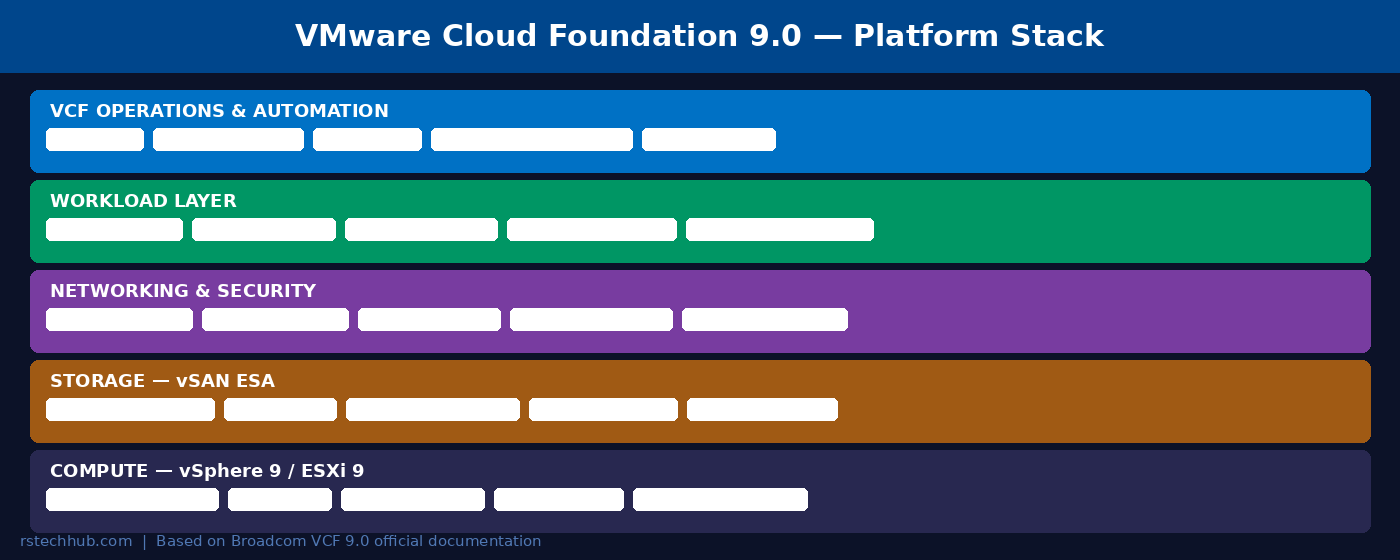
The platform sits on five logical layers. At the bottom is vSphere 8 / ESXi 8 doing what it’s always done well, virtualize compute at high density. Above that is vSAN with the Express Storage Architecture (ESA), the new storage engine Broadcom has been pushing since VCF 8. Then NSX handles east-west networking and security. On top of those three sits the workload layer. VMs, Kubernetes clusters via vSphere with Tanzu (backed by Tanzu Kubernetes Grid / TKG, marketed as VKS within VCF), and AI-oriented workloads. VMs and containers share the same underlying platform but maintain distinct management contexts. Supervisor Nodes and separate workload domains remain required. And over all of it is VCF Operations + VCF Automation, the unified management plane.
The key design principle is that nothing runs outside this stack. There’s no “install standalone vSphere, then add VCF later” model for full enterprise private clouds anymore. You deploy the VCF Installer and the whole stack comes up together, that’s a big deal for Day-0 repeatability. That said, smaller environments can still deploy VMware vSphere Foundation (VVF) 9.0, a compute-and-storage-focused offering released June 17, 2025, that lets mid-market shops run vSphere and vSAN without the full VCF management stack.
What’s Actually New. The Features That Matter
NVMe Memory Tiering
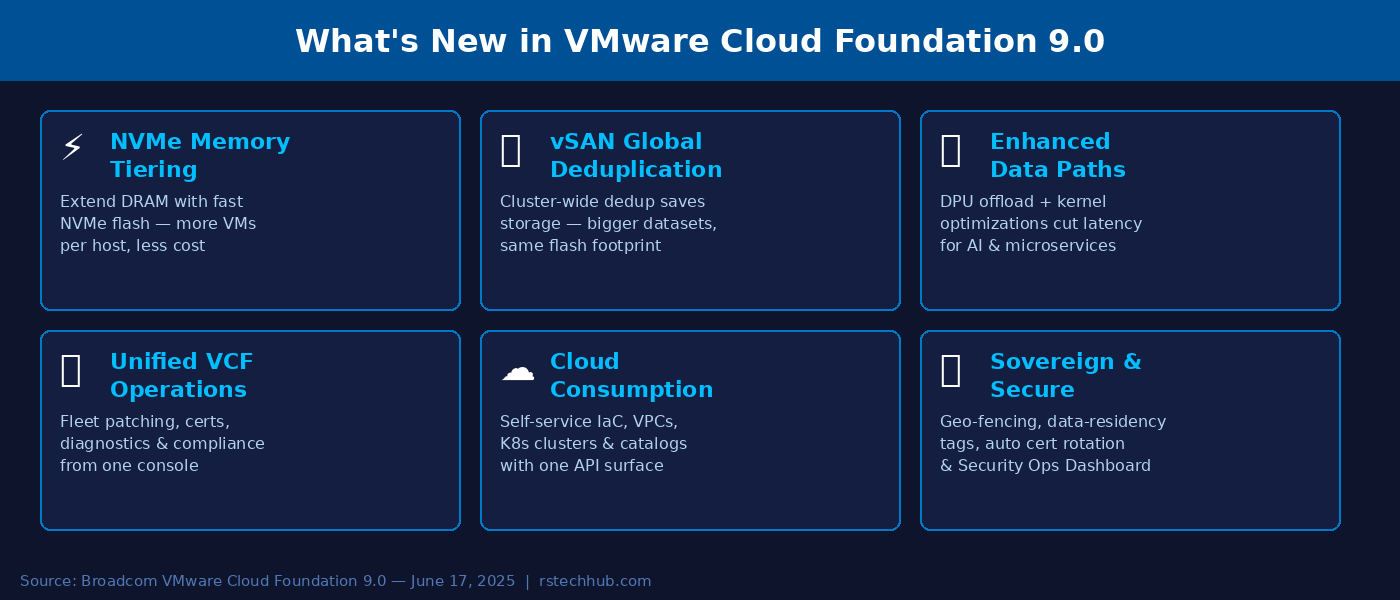
This is the one I’ve gotten the most questions about. VCF 9.0 lets ESXi treat local NVMe devices as a second memory tier, so instead of DRAM being the hard ceiling on memory per host, you can extend that pool with fast NVMe flash. Cold memory pages move to NVMe, hot working sets stay in DRAM. In practice this means you can run more VMs or larger containers per host without adding physical RAM. For workloads like in-memory databases, JVM applications, or ML inference, the economics shift quite meaningfully.
vSAN Global Deduplication
In older vSAN versions, deduplication worked at the disk group level, you’d get dedup savings within a node but not across nodes. VCF 9.0 pushes this to cluster scope. Identical blocks are identified and deduplicated across the entire cluster, so the savings compound as your cluster grows. This feature launched as Limited Availability (LA) in VCF 9.0 (no Request for Quote required) and became Generally Available (GA) in VCF 9.1.
improved Data Paths and DPU Offload
The storage and network data paths have been reworked with new kernel optimizations that reduce latency on east-west traffic. There’s also optional Data Processing Unit (DPU) offload, if your servers have a DPU (like NVIDIA BlueField or AMD Pensando), VCF can offload networking and security functions off the host CPUs entirely. The result is measurably lower storage latency, better throughput for AI pipelines, and less CPU overhead on the hypervisor. In environments where CPU was the bottleneck rather than memory, this can change the VM density math significantly.
VCF Operations. The New Home Base
VCF Operations replaces the fragmented console experience from earlier releases. Fleet management, certificate rotation, host commissioning, patch scheduling, configuration drift detection, and the security operations dashboard all live here now. The “fleet” concept means you can manage multiple VCF deployments across different sites from one place, useful if you’re running a regional private cloud or a sovereign deployment with multiple datacenters.
The diagnostic tooling is genuinely improved. AI-assisted log correlation can surface root causes before your ticket queue even registers the incident. Whether you trust AI-driven diagnostics in production is a different conversation, but it’s there and it’s reasonably useful for initial triage.
Unified Cloud Automation
VCF Automation (the renamed Aria Automation) is now the single interface for infrastructure as code. There’s one API surface, Terraform provider support, GitOps integration, and a self-service catalog that teams can publish for developers to consume without touching the underlying platform config. Pre-built blueprints cover common stacks (databases, Kubernetes clusters, AI inference environments) so you’re not starting from scratch on every new project.
For organizations where the Dev/Infra boundary is a constant source of friction, this is probably the biggest day-to-day win. Developers get their own API endpoint and self-service experience; infrastructure teams keep control over policy and quotas without becoming a ticket-processing bottleneck.
Kubernetes. VKS Side by Side with VMs
VMware vSphere Kubernetes Service (VKS) is fully integrated in VCF 9.0, and for the first time it genuinely feels like a first-class citizen rather than a bolt-on. You can run VMs and Kubernetes clusters on the same infrastructure without the constant context switching between vSphere and a separate K8s management layer. Argo CD integration is included out of the box, so container-based workloads can go from repository to production through native CI/CD hooks without additional tooling.
AI Workload Support
Broadcom has pushed hard on AI positioning for this release, and some of it is marketing, but some of it is real. GPU vMotion (the ability to live-migrate GPU-backed VMs) is now 6x faster thanks to GPU memory streaming. That’s meaningful for inference workloads where you can’t just pause and migrate the way you would a regular VM. The NVMe tiering and DPU offload features mentioned above also directly benefit AI training and inference jobs that are memory and bandwidth bound. And VCF Private AI Foundation with NVIDIA is available as an advanced service for organizations building on-premises AI infrastructure at scale.
Security and Sovereign Cloud
The security story in VCF 9.0 is built around the idea that compliance shouldn’t be a periodic audit exercise, it should be continuous. The Security Operations Dashboard gives you real-time visibility into your attack surface, configuration compliance scanning against CIS and NIST baselines, and automated certificate rotation across the fleet. Data-residency tags and geo-fencing policies let you enforce where workloads can and can’t run, which is important for sovereign cloud deployments where regulatory requirements tie data to specific jurisdictions.
Cost and Chargeback. Finally Built In
Every private cloud operator eventually gets asked by finance: “What does this VM actually cost us?” In previous VCF versions, answering that question usually meant building your own model in a spreadsheet or buying a separate Aria tool. VCF 9.0 includes cost management, showback, and chargeback capabilities in the platform. Resource consumption maps to cost by tenant or business unit, and the dashboards are invoice-ready. This isn’t just monitoring, you can set budget constraints and get predictive spend visibility, which changes the conversation with stakeholders who keep asking why private cloud is worth the investment.
How Does VCF 9.0 Compare to Running the Components Separately?
The honest answer is that the platform premium VCF charges over licensing vSphere and vSAN individually is real, and it’s not for everyone. For smaller environments, the integrated lifecycle management and unified operations don’t justify the cost difference.
But for environments above roughly 100 hosts, especially those with compliance requirements, multi-site deployments, or a need to support both VMs and containers at scale, the operational savings from VCF’s integrated patch management alone tend to pay for themselves within the first year. Add in the automation layer and the self-service catalog, and you’re also reducing the infrastructure team headcount needed to support the platform. That’s where the math works out in VCF’s favor.
📚 Official References
- VCF 9.0 Release Notes. Broadcom TechDocs
- VCF 9.0 Documentation Landing Page. Broadcom TechDocs
- What’s New in VMware Cloud Foundation 9.0. VMware Blog
- What’s New with vSphere in VCF 9.0. VMware Blog
- Modernize Storage with vSAN in VCF 9.0. VMware Blog
- Kubernetes on VCF 9.0. VMware Blog
- How to Upgrade to VCF 9.0. VMware Blog
- Upgrading from VCF 5.2 to 9.0: Top 10 Questions. VMware Blog
- VCF 9.0 Downloads. Broadcom Support Portal
- VCF 9.0 Hands-On Labs. VMware HOL