
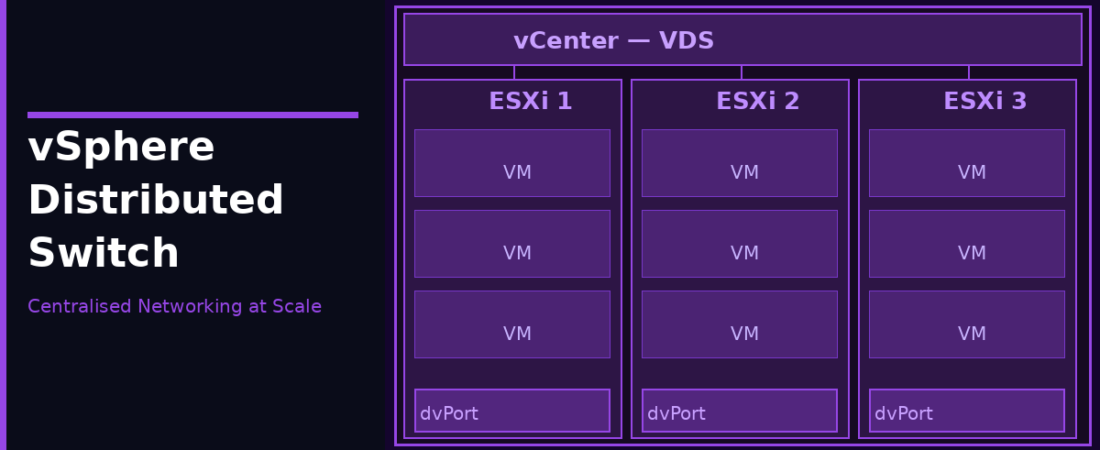
If you’ve outgrown standard switches, or you just got handed a vSphere environment with a VDS already in place, this post is for you. The vSphere Distributed Switch (VDS, sometimes called DVS) is VMware’s enterprise-grade virtual switching platform. It shifts network configuration out of individual hosts and into vCenter, which changes the whole management model in ways that matter at scale.
VDS vs vSS: What Actually Changes
With a standard switch (vSS), each host manages its own switch configuration. Ten hosts means ten places to make changes. The VDS flips this. You define the switch once in vCenter, and every ESXi host that joins the VDS gets the same configuration automatically.
What you configure in vCenter with a VDS: distributed port groups and their policies, uplink assignments, traffic shaping (both inbound and outbound), LACP link aggregation groups, PVLAN configurations, port mirroring sessions, and NetFlow export settings.
What still lives on each host: the actual data plane. The ESXi host handles the packet switching itself. vCenter just manages the configuration. Even if vCenter goes down, VMs keep networking, they just can’t have their configuration changed until vCenter is back.
VDS Architecture
Uplink Port Groups. Abstract representations of the physical NICs. When you add a host to the VDS, you map its physical NICs (vmnic adapters) to the uplink ports on the distributed switch. One VDS can span up to 1,000 hosts.
Distributed Port Groups (dPGs). Work like port groups on a vSS but with much more granular control. You can configure policies per-port (not just per-port-group), which means individual VMs can have different security, shaping, or VLAN settings even if they’re on the same distributed port group.
📊 Licensing Note
Under Broadcom’s modern subscription framework, the vSphere Distributed Switch (VDS) is no longer locked behind a standalone “Enterprise Plus” tier. VDS capabilities are included by default in both VMware vSphere Foundation (VVF) and VMware Cloud Foundation (VCF) packages. If your environment has been migrated to these current subscriptions, you automatically have full access to VDS features across your clusters.
Creating a VDS
In the vSphere Client, go to Networking → right-click your datacenter → Distributed Switch → New Distributed Switch. The wizard walks you through naming the switch and picking the version (match your lowest ESXi host version), setting the number of uplink ports (typically 2 or 4), and creating an initial distributed port group.
After creation, add hosts via Add and Manage Hosts. This is where you map physical NICs to uplinks and migrate VMkernel adapters from old switches.
LACP on VDS
LACP (Link Aggregation Control Protocol) lets you bundle multiple physical NICs into a single logical link for higher bandwidth and redundancy. Your ToR (Top of Rack) switch needs to be configured with an LACP port channel on the same ports.
On the VDS, you configure a Link Aggregation Group (LAG) and then assign physical NICs from your hosts to that LAG. vSphere 8.0 uses improved LACP, which supports multiple LAGs per VDS and more LACP modes. If you’re migrating from an older VDS version, check Broadcom KB 318706 for the conversion procedure.
# Check current LACP mode via CLI
esxcli network vswitch dvs vmware lacp status get
Private VLANs (PVLANs)
PVLANs give you isolation between VMs on the same VLAN, useful for multi-tenant environments where you want hosts on the same IP subnet to not talk directly to each other. Three port types:
- Promiscuous. Can talk to all ports (typically your router/firewall)
- Isolated. Can only talk to the promiscuous port, not to other isolated ports
- Community. Can talk to ports in the same community and the promiscuous port, but not isolated ports or other communities
PVLANs are only available on VDS, not on standard switches.
Network I/O Control (NIOC)
NIOC lets you guarantee and limit bandwidth for different traffic types on shared uplinks. You define shares and reservations for traffic categories like vMotion, management, vSAN, iSCSI, and VM traffic. When uplinks are under contention, NIOC makes sure critical traffic doesn’t get starved by VM data traffic. Enable it on the VDS settings, then configure system traffic resource pools as needed. On 10GbE and 25GbE uplinks where you’re consolidating multiple traffic types, NIOC is genuinely important.
Port Mirroring
VDS supports port mirroring sessions to mirror traffic to a destination port (typically a VM running a packet analyser). Modes include Distributed Port Mirroring (source and destination on same VDS), Remote Mirroring Source (mirrors to a VLAN for transport to remote analyser), and Encapsulated Remote Mirroring L3 (GRE-encapsulated to an IP destination).
NetFlow
Configure the VDS to export NetFlow records to a collector. This gives visibility into VM-to-VM traffic flows without deploying agents on VMs. Useful for capacity planning and security monitoring. Configure under VDS settings → NetFlow.
Backing Up VDS Configuration
Don’t skip this. A VDS configuration export saves your entire switch setup as an XML file. Right-click the VDS → Settings → Export Configuration. Do this before any significant networking changes and after you’ve got things working the way you want them.
When to Choose VDS
VDS makes sense when you have more than 4–5 hosts, need consistent network policies across the cluster, want LACP or PVLAN support, need traffic visibility via NetFlow or port mirroring, or require bidirectional traffic shaping. The management overhead drops significantly once you stop configuring switches host by host. Because VDS is standard inside VVF and VCF subscriptions, there is no licensing penalty for adopting it across your infrastructure.