
This is Part 1 of a 10-part series that takes VMware Cloud Foundation from first principles all the way to a working lab build. If you have landed here cold, start at the top. Everything after this assumes the groundwork we cover below.
The Short Answer
VMware Cloud Foundation (VCF) is Broadcom’s flagship private cloud platform. Strip away the enterprise marketing, and it boils down to a single objective: VCF bundles the entire VMware software stack, spanning compute, storage, networking, security, and cloud management, into an automated platform that you deploy, patch, and operate as a unified system.
If you have worked with traditional vSphere, you already know the core building blocks. What VCF adds is the orchestration layer that binds them together, driven by lifecycle automation. Instead of upgrading individual products by hand and crossing your fingers that the versions interoperate smoothly, you manage the complete environment through a centralized control plane. That structural shift is exactly why the platform exists.
The Underlying SDDC Model
VCF is a highly structured, opinionated realization of the Software-Defined Data Center (SDDC). Rather than purchasing discrete hardware for compute, dedicated storage arrays, and standalone physical firewalls, you run all of these operational functions in software on top of standard x86 server hardware.
Your compute resource is virtualized by the underlying hypervisor. Your storage is aggregated into a shared pool using local disks inside those same servers. Your network topologies and security policies are pushed into a software overlay running on top of basic physical switches. Because the entire topology lives in software, it can be provisioned via APIs, standardized into templates, and scaled out on demand.
Engineers have spent years manually building custom SDDCs by installing vSphere, bolting on vSAN, and manually configuring NSX. While that manual strategy works, it introduces massive operational overhead, making every major lifecycle upgrade an extensive research project. VCF solves this by handling the underlying integration and keeping the entire stack within a strictly tested, fully supported state.
Core Components
A modern VCF deployment relies on several primary products working together under the 9.x architecture.
| Component | Function |
|---|---|
| VCF Installer | A dedicated engine used to plan, validate, and execute the initial deployment. |
| vSphere | The core virtualization layer, where ESX hosts provide compute resources managed by vCenter. |
| vSAN | The software-defined storage layer that pools local server drives into a unified datastore. |
| NSX | The networking layer providing software-defined switching, routing, and distributed firewalls. |
| VCF Operations | The central platform console for health monitoring, log analytics, and global operations. |
| VCF Automation | The self-service delivery layer used to provision virtual machines and containerized workloads. |
VCF 9.x updates several familiar branding elements:
- Aria Rebranding: The Aria brand has been retired. The management tools previously known as Aria Operations and Aria Automation are now natively embedded as VCF Operations and VCF Automation.
- ESX Nomenclature: Broadcom has officially updated the hypervisor nomenclature to ESX for the 9.x generation, removing the trailing “i” from product documentation.
- VCF Management Services: Version 9.1 introduces a containerized Management Services layer. This architectural change consolidates lifecycle, identity management, and orchestration engines into a unified runtime, moving away from fragmented standalone appliances.
Platform Architecture in 9.x
The logical hierarchy of VCF 9.x uses distinct nesting boundaries:
- VCF Instance: The physical infrastructure framework encompassing your compute, storage, and networking layers. An instance is built out using logical domains.
- VCF Domains: Every domain includes its own vCenter, clustered ESX hosts with distributed configurations, and integrated NSX management.
- Management Domain: Automatically provisioned first to host infrastructure management components like the VCF operational tools.
- Workload Domain: Dedicated clusters deployed afterward to isolate actual business workloads from the primary management plane.
- VCF Fleet: A macro-management boundary containing multiple VCF instances or standalone vCenter environments orchestrated by a single deployment of VCF Operations and Automation.
- VCF Private Cloud: The highest container tier, capable of unifying multiple distributed fleets under a global organizational umbrella.
VCF 9.x reshapes how you interact with these layers. While SDDC Manager remains an essential backend appliance for triggering infrastructure workflows, deployment pathways, and online depot connections, day-to-day configuration and workload domain monitoring are heavily integrated into the VCF Operations interface.
When to Choose VCF
VCF is optimized for organizations requiring an enterprise-grade private cloud that operates identically across core data centers, edge environments, and public cloud targets. It is built for teams running a mixed environment of traditional VMs, containerized platforms, and modern AI/ML datasets. If your goal is to let application teams provision infrastructure via self-service catalogs without logging manual service tickets, the automated single-lifecycle architecture delivers immediate value.
Conversely, VCF represents a heavyweight architecture with demanding minimum resource thresholds and a comprehensive software licensing model. For smaller environments running static workloads on a handful of hosts, the full automated platform is usually unnecessary. For those footprints, Broadcom offers vSphere Foundation (VVF), providing virtualized compute, storage, and intelligent operations without the complete multi-tenant cloud automation framework.
I plan labs and upgrades around this distinction all the time. Reaching for the biggest platform by default is how budgets and complexity quietly balloon. Match the tool to your actual requirement.
Going deeper: what’s new in VCF 9.0
This section brings in the feature-by-feature breakdown from my original VCF 9.0 overview, so the whole picture lives in one place.
What’s Actually New. The Features That Matter
NVMe Memory Tiering
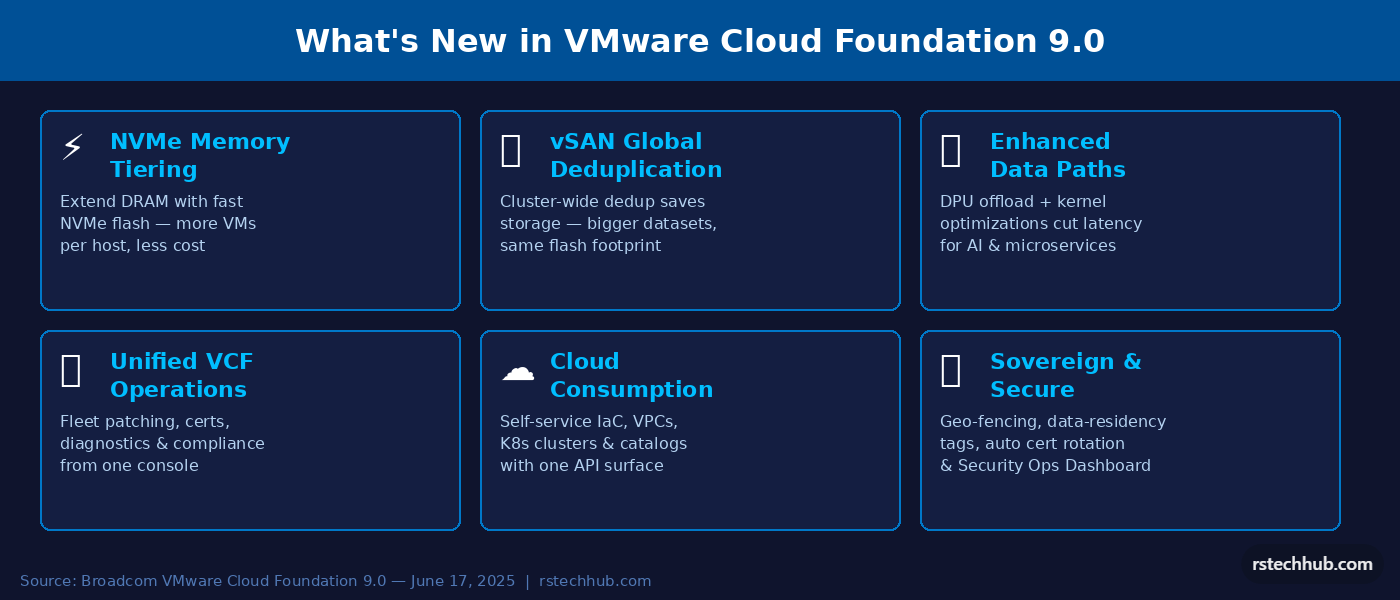
This is the one I’ve gotten the most questions about. VCF 9.0 lets ESXi treat local NVMe devices as a second memory tier, so instead of DRAM being the hard ceiling on memory per host, you can extend that pool with fast NVMe flash. Cold memory pages move to NVMe, hot working sets stay in DRAM. In practice this means you can run more VMs or larger containers per host without adding physical RAM. For workloads like in-memory databases, JVM applications, or ML inference, the economics shift quite meaningfully.
vSAN Global Deduplication
In older vSAN versions, deduplication worked at the disk group level, you’d get dedup savings within a node but not across nodes. VCF 9.0 pushes this to cluster scope. Identical blocks are identified and deduplicated across the entire cluster, so the savings compound as your cluster grows. This feature launched as Limited Availability (LA) in VCF 9.0 (no Request for Quote required) and became Generally Available (GA) in VCF 9.1.
improved Data Paths and DPU Offload
The storage and network data paths have been reworked with new kernel optimizations that reduce latency on east-west traffic. There’s also optional Data Processing Unit (DPU) offload, if your servers have a DPU (like NVIDIA BlueField or AMD Pensando), VCF can offload networking and security functions off the host CPUs entirely. The result is measurably lower storage latency, better throughput for AI pipelines, and less CPU overhead on the hypervisor. In environments where CPU was the bottleneck rather than memory, this can change the VM density math significantly.
VCF Operations. The New Home Base
VCF Operations replaces the fragmented console experience from earlier releases. Fleet management, certificate rotation, host commissioning, patch scheduling, configuration drift detection, and the security operations dashboard all live here now. The “fleet” concept means you can manage multiple VCF deployments across different sites from one place, useful if you’re running a regional private cloud or a sovereign deployment with multiple datacenters.
The diagnostic tooling is genuinely improved. AI-assisted log correlation can surface root causes before your ticket queue even registers the incident. Whether you trust AI-driven diagnostics in production is a different conversation, but it’s there and it’s reasonably useful for initial triage.
Unified Cloud Automation
VCF Automation (the renamed Aria Automation) is now the single interface for infrastructure as code. There’s one API surface, Terraform provider support, GitOps integration, and a self-service catalog that teams can publish for developers to consume without touching the underlying platform config. Pre-built blueprints cover common stacks (databases, Kubernetes clusters, AI inference environments) so you’re not starting from scratch on every new project.
For organizations where the Dev/Infra boundary is a constant source of friction, this is probably the biggest day-to-day win. Developers get their own API endpoint and self-service experience; infrastructure teams keep control over policy and quotas without becoming a ticket-processing bottleneck.
Kubernetes. VKS Side by Side with VMs
VMware vSphere Kubernetes Service (VKS) is fully integrated in VCF 9.0, and for the first time it genuinely feels like a first-class citizen rather than a bolt-on. You can run VMs and Kubernetes clusters on the same infrastructure without the constant context switching between vSphere and a separate K8s management layer. Argo CD integration is included out of the box, so container-based workloads can go from repository to production through native CI/CD hooks without additional tooling.
AI Workload Support
Broadcom has pushed hard on AI positioning for this release, and some of it is marketing, but some of it is real. GPU vMotion (the ability to live-migrate GPU-backed VMs) is now 6x faster thanks to GPU memory streaming. That’s meaningful for inference workloads where you can’t just pause and migrate the way you would a regular VM. The NVMe tiering and DPU offload features mentioned above also directly benefit AI training and inference jobs that are memory and bandwidth bound. And VCF Private AI Foundation with NVIDIA is available as an advanced service for organizations building on-premises AI infrastructure at scale.
Security and Sovereign Cloud
The security story in VCF 9.0 is built around the idea that compliance shouldn’t be a periodic audit exercise, it should be continuous. The Security Operations Dashboard gives you real-time visibility into your attack surface, configuration compliance scanning against CIS and NIST baselines, and automated certificate rotation across the fleet. Data-residency tags and geo-fencing policies let you enforce where workloads can and can’t run, which is important for sovereign cloud deployments where regulatory requirements tie data to specific jurisdictions.
Cost and Chargeback. Finally Built In
Every private cloud operator eventually gets asked by finance: “What does this VM actually cost us?” In previous VCF versions, answering that question usually meant building your own model in a spreadsheet or buying a separate Aria tool. VCF 9.0 includes cost management, showback, and chargeback capabilities in the platform. Resource consumption maps to cost by tenant or business unit, and the dashboards are invoice-ready. This isn’t just monitoring, you can set budget constraints and get predictive spend visibility, which changes the conversation with stakeholders who keep asking why private cloud is worth the investment.
The Bottom Line
VCF 9.x represents a major shift in how VMware environments are built and managed. By shifting day-to-day operations into a unified interface and automating full-stack lifecycle management, Broadcom is pushing hard toward true private cloud infrastructure. If you are planning an upgrade to 9.x, standardizing these new logical concepts (fleets, instances, and domains) is your essential first step.