
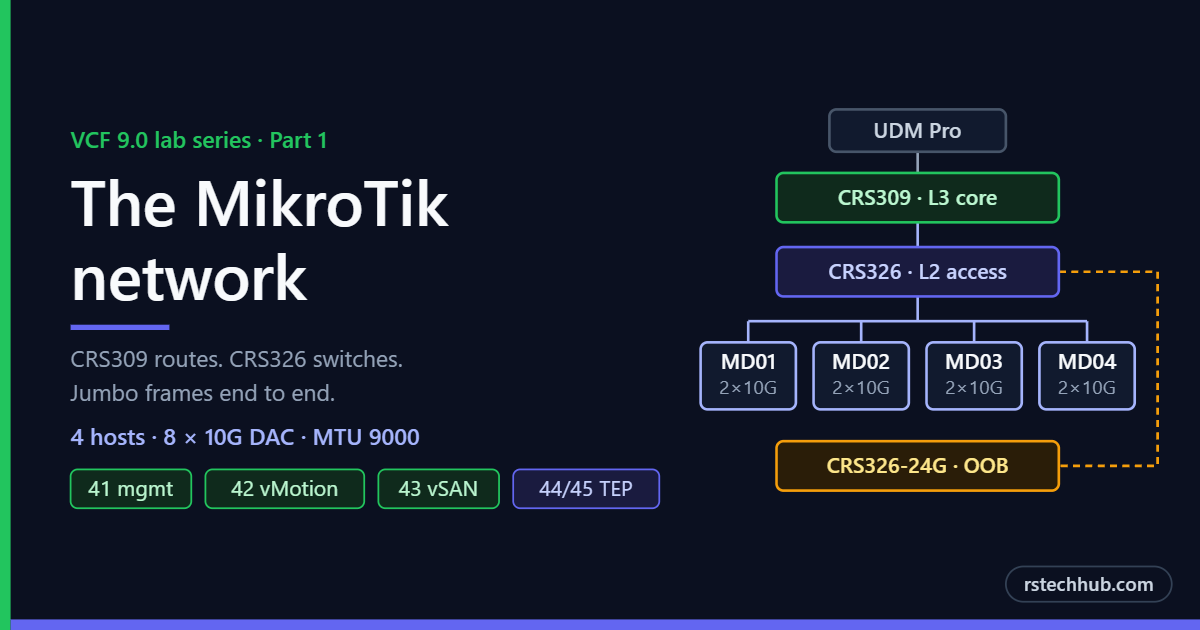
Before any ESX ISO gets mounted, the network has to be right. VCF is unforgiving here. A missing VLAN on one host port or an MTU mismatch on a trunk will surface hours later as a failed validation or a vSAN partition. So Part 1 of this series covers the physical network my four-node management domain sits on. Part 2 covers the ESX 9.0 installs and the VCF 9.0 deployment, and Part 3 the upgrade to 9.1.
For the concepts behind this build, see VCF 9.x Fundamentals, in particular Part 5 on hardware and Part 6 on networking with NSX.
The hardware
The management domain is four Dell R640s, named MD01 to MD04. Full specs for every host in the lab, including the DL380 and the TrueNAS R620, are on the MyLab page. For this post, only the network cards matter.
Each R640 has a Mellanox CX422A with two 25GbE SFP28 ports, but my access switch is SFP+. Each host connects with two 10G SFP+ DAC cables and links at 10G, which still clears VCF’s 10GbE minimum.
I also recommend updating every host to Dell’s latest firmware (BIOS, iDRAC, HBA330, CX422A and NVMe) before installing ESX. It gives the best compatibility with ESX 9 and rules out a whole class of driver and link problems before they cost you an afternoon.
Software versions
The build uses VCF 9.0.2.0, released on 20 January 2026. The VCF Installer checks every component against the Bill of Materials, so the ESX build on the hosts has to match it exactly, not just the version number.
| Component | Version | Build |
|---|---|---|
| VCF Installer | 9.0.2.0 | 25151285 |
| VMware ESX | 9.0.2.0 | 25148076 |
| VMware vCenter | 9.0.2.0 | 25148086 |
| VMware NSX | 9.0.2.0 | 25150386 |
| SDDC Manager | 9.0.2.0 | 25151285 |
| VCF Operations | 9.0.2.0 | 25137838 |
| VCF Operations collector | 9.0.2.0 | 25137840 |
| VCF Operations fleet management | 9.0.2.0 | 25137839 |
| VCF Operations for logs | 9.0.2.0 | 25137850 |
| VCF Automation | 9.0.2.0 | 25145732 |
| VCF Identity Broker | 9.0.2.0 | 25084325 |
| VCF Download Tool | 9.0.2.0 | 24962179 |
| VMware Tools | 13.0.10 | 25056151 |
Source: VMware Cloud Foundation 9.0.2.0 Bill of Materials on Broadcom TechDocs. VCF Installer 9.0.2.0 is also the version required to download and deploy any 9.0.x component, so it is the one to start with. Check the 9.0.x patch release notes before downloading, in case a newer patch has replaced any of these builds.
The design
Three MikroTik switches, each with one job:
| Switch | Role |
|---|---|
| CRS309-1G-8S+ | L3 core. Every lab gateway lives here |
| CRS326-24S+2Q+ | L2 access for the servers |
| CRS326-24G-2S+ | Out-of-band switch for iDRAC and iLO |
The CRS309 does the routing with L3 hardware offload enabled, so inter-VLAN traffic is switched in silicon rather than on the CPU. Keeping every gateway on one box also means there’s one place to look when something can’t reach its default route. The CRS326-24S+ just switches frames.
The CRS309 also has my Synology on sfp3 and a management workstation port on sfp4, both access ports in VLAN 41.
VLAN plan
| VLAN | Name | MTU | Used for |
|---|---|---|---|
| 40 | Transport | 9000 | Uplink to the internet edge, switch management |
| 41 | ESX management | 9000 SVI | ESX hosts and every VCF appliance |
| 42 | vMotion | 9000 | vMotion |
| 43 | vSAN | 9000 | vSAN ESA |
| 44 | NSX edge TEP | 9000 | Edge overlay |
| 45 | NSX host TEP | 9000 | Host overlay |
| 46 | NSX uplink | 9000 | T0 uplinks |
| 47 | Spare | 9000 | |
| 48 | NFS | 9000 | TrueNAS |
| 49 | iSCSI | 9000 | |
| 50 | VMs | 9000 | Nested lab, general VMs |
| 51–60 | Future | 9000 | Nested labs |
| 61 | OOB | 1500 | iDRAC and iLO |
DHCP runs on the CRS309 for the management VLAN, the VM VLAN and the future range, with the management pool pushed to the very top of the subnet, well away from every static address. DNS lives on two domain controllers, covered in Core Infrastructure, Part 1, and the CRS309 is the lab’s NTP server.
The one routing exception
VLAN 61 is routed by the OOB switch rather than the CRS309. The 24G owns the OOB gateway and hands out DHCP to the iDRACs, and the CRS309 has a single static route pointing the OOB subnet at it.
On the uplink, the CRS309 sends VLAN 61 untagged on sfp8 and the CRS326 puts it back into 61 with pvid 61 on sfp21. It’s a little unconventional. It works, so I’ve left it alone.
Jumbo frames end to end
vSAN ESA and vMotion get MTU 9000 on the vmkernel side, so every hop has to carry at least 9018 bytes: 9000 plus the Ethernet header and the 802.1Q tag.
| Device | Setting |
|---|---|
| CRS309 ports | l2mtu 9216, MTU 9000 |
| CRS309 bridge and SVIs | MTU 9000 |
| CRS326-24S+ ports | l2mtu 10218, MTU 9000 |
| VLAN 61 (OOB) | 1500. iDRACs don’t need jumbo |
Because the SVIs are 9000 too, routed overlay traffic between host TEPs (VLAN 45) and edge TEPs (VLAN 44) keeps its jumbo frames through the CRS309.
Host port configuration
All eight R640 ports on the CRS326-24S+ (sfp3 to sfp10) get identical config: admit all frame types, pvid 1, and every lab VLAN tagged.
The port settings are the same eight times over, so a short loop does it in one go:
# Port settings for the R640 host ports (sfp3 to sfp10)
:foreach p in={3;4;5;6;7;8;9;10} do={
    /interface bridge port set [find interface=("sfp-sfpplus" . $p)] \
        frame-types=admit-all pvid=1
}
VLAN membership then looks like this on the bridge:
| VLANs | Purpose | Host ports (tagged) | Uplinks (tagged) |
|---|---|---|---|
| 40 | Transport | sfp3 to sfp10 | sfp15, sfp21 |
| 41–50 | VCF and lab services | sfp3 to sfp10 | sfp15, sfp21 |
| 51–60 | Nested labs | sfp3 to sfp10 | sfp15, sfp21 |
| 61 | Out of band | sfp3 to sfp10 | sfp15, sfp21 |
To check it, compare the current-tagged column against the table above:
/interface bridge vlan print detail
/interface bridge port print where interface~"sfp-sfpplus([3-9]|10)\$"
VCF only needs 41 to 46 on the host ports. I carry everything so the same hosts can run nested labs later without another switch change.
One consequence: with pvid 1, untagged frames land in VLAN 1, which isn’t routed. So the first thing I do in the DCUI on every host is set the management VLAN to 41. A fresh ESX install that tries DHCP untagged gets nothing.
Port map
| Host | vmnic0 | vmnic1 |
|---|---|---|
| MD01 | sfp3 | sfp4 |
| MD02 | sfp5 | sfp6 |
| MD03 | sfp7 | sfp8 |
| MD04 | sfp9 | sfp10 |
Addressing approach
Rather than a full IP table, here are the rules the address plan follows. They matter more than the numbers:
- Each host uses the same last octet on management, vMotion and vSAN, so any vmkernel address tells you which host it belongs to.
- Host TEPs come from a static pool, two per host. The TEP VLAN has no DHCP, and I want to know exactly where every TEP is.
- Appliances sit in one contiguous block, in deployment order.
- Pools that VCF manages itself, such as the VCF Automation nodes and the 9.1 Management Services, are reserved up front with no DNS records, so nothing else can take them.
- Each lab lives in its own DNS zone. Every name is lowercase, with forward and reverse records in place before the installer ever runs.
Things that caught me out
Three switches, one prompt. I exported the OOB switch three times while convinced I was on the core switch. The 24G’s clock was also six days behind because it had no NTP client, so its exports looked stale, which didn’t help. The fix took two lines:
/system identity set name=CRS309-L3-CORE
/system identity set name=CRS326-24S-CORE
/system identity set name=CRS326-24G-OOB
“Trunk all VLANs” doesn’t exist with VLAN filtering on. I was sure MD01’s ports passed everything. They only carried 51–60, because a port only passes the VLANs it’s listed against in /interface bridge vlan. The current-tagged column is the truth. If a port isn’t there, it isn’t passing that VLAN, whatever the intent was.
Dynamic entries hide gaps. When I created SVIs for 52 to 60 on the CRS309, RouterOS added a dynamic bridge VLAN entry with only bridge1 as a member. The gateways existed, but no physical port carried them. I’ve left 52–60 that way for now. When I need them, it’s one line to widen the static 51 entry.
Safe Mode belongs to a session. I made the port changes in one terminal and tried to commit from another, and RouterOS asked whether to unroll or release. Answering u would have thrown away every change. Commit from the session that entered Safe Mode, or answer r.
Static IPs inside a DHCP pool. When I merged the address plans for all my labs into one file, most of the nested VCF 9.1 block sat inside the management DHCP range. Nothing had clashed yet, but it would have eventually. Rather than renumber a working lab, I moved the pool to the top of the subnet instead.
Validation
On the switches:
/interface bridge vlan print detail      # current-tagged per VLAN
/interface bridge port print             # pvid, frame types, H flag for offload
/ping 1.1.1.1 src-address=<mgmt-gateway> # lab subnets reach the internet
On each host after the ESX install:
esxcli network nic list                        # both vmnics Up at 10000
vmkping -I vmk1 -d -s 8972 <peer-vmotion-ip>   # vMotion jumbo
vmkping -I vmk2 -d -s 8972 <peer-vsan-ip>      # vSAN jumbo
And from the CRS309, one routed jumbo test across the uplink:
/ping <host-vmotion-ip> size=9000 do-not-fragment count=3With the network settled, Part 2 moves to the hosts: ESX 9.0 on MD01 to MD04, reserving the fourth NVMe for memory tiering before vSAN can claim it, and the VCF Installer on the DL380.