
Everything in Part 1‘s design runs on one machine: an HPE DL380 Gen9 that sits outside every VCF domain. This post documents how that host is set up and why, before any domain controller goes on it.
Why a separate core host
The services a VCF domain depends on, such as DNS, directory, time and the installer, can never run inside that domain. A dedicated host keeps them available when a lab is being rebuilt, upgraded or is simply powered off.
The hardware
| Component | Spec |
|---|---|
| Server | HPE ProLiant DL380 Gen9 |
| CPU | 2× Xeon E5-2690 v3 |
| Memory | 768 GB DDR4 |
| Storage controllers | 3× Smart Array P440 |
| Network | HPE P225p, 2× 25GbE |
| Boot | HPE boot card |
Full specs for every host in the lab are on the MyLab page.
Why ESX 8, not 9
The E5-2690 v3 is a Haswell-generation CPU, which ESX 9 does not support. The core host therefore stays on ESXi 8.0 U3, patched to the latest build. That is also why it is a good fit for this role: it runs the lab plumbing, not the VCF workloads being tested. The Gen9 is not on the ESXi 8 compatibility list for every component, which is worth knowing for a lab and a non-starter for production.
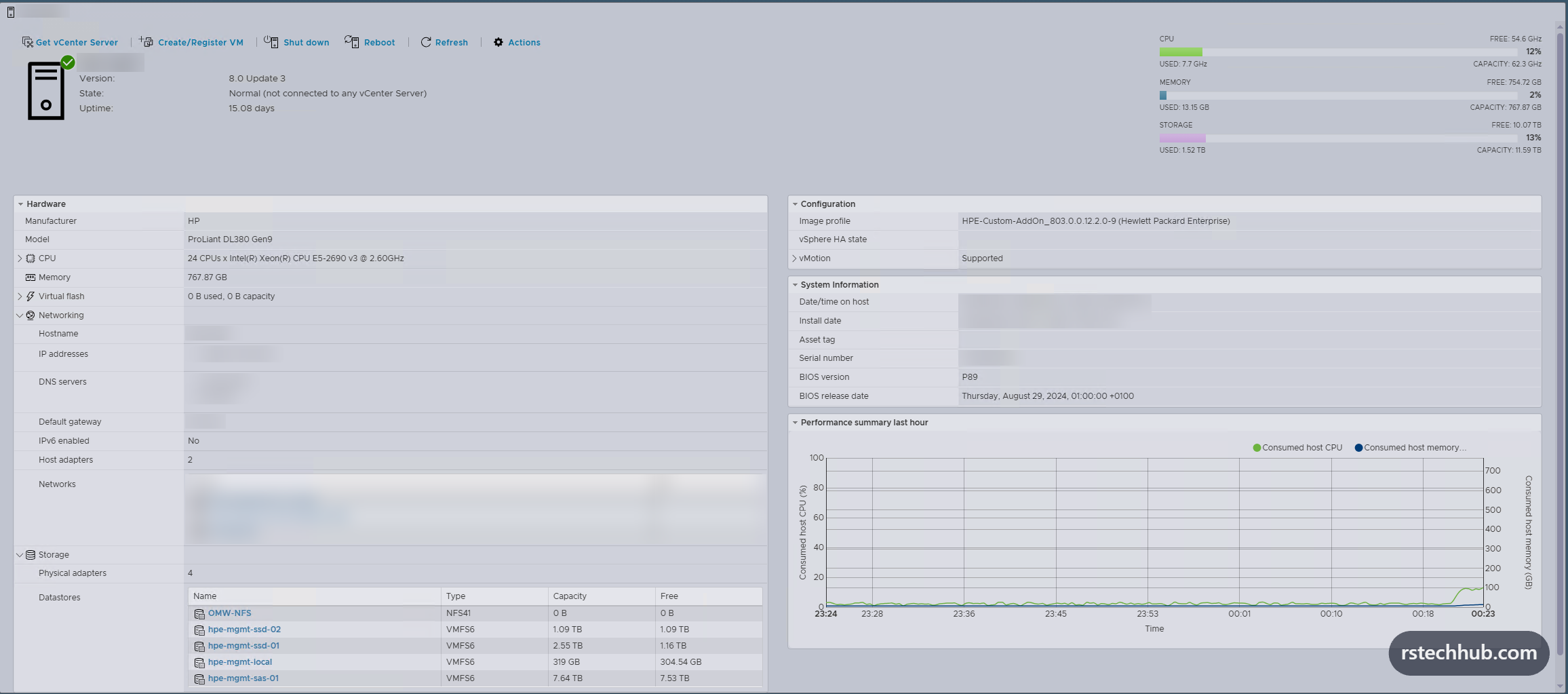
The host runs ESXi 8.0 Update 3 from HPE’s custom image (HPE-Custom-AddOn 803.0.0.12.2.0-9), which carries HPE’s drivers and management tools for the Smart Array controllers and the rest of the Gen9 hardware.
Storage
The three P440 controllers present separate arrays, each formatted as its own VMFS datastore. Keeping them separate means the two domain controllers can live on different arrays, so a single array failure never takes out both.
| Datastore | Type | Capacity | Used for |
|---|---|---|---|
| SSD array 1 | VMFS 6 | 2.55 TB | dc01 and the latency-sensitive management VMs |
| SSD array 2 | VMFS 6 | 1.09 TB | dc02, kept apart from dc01 |
| SAS array | VMFS 6 | 7.64 TB | Bulk storage: ISOs, the offline depot, templates |
| Local | VMFS 6 | 319 GB | Scratch only |

Networking
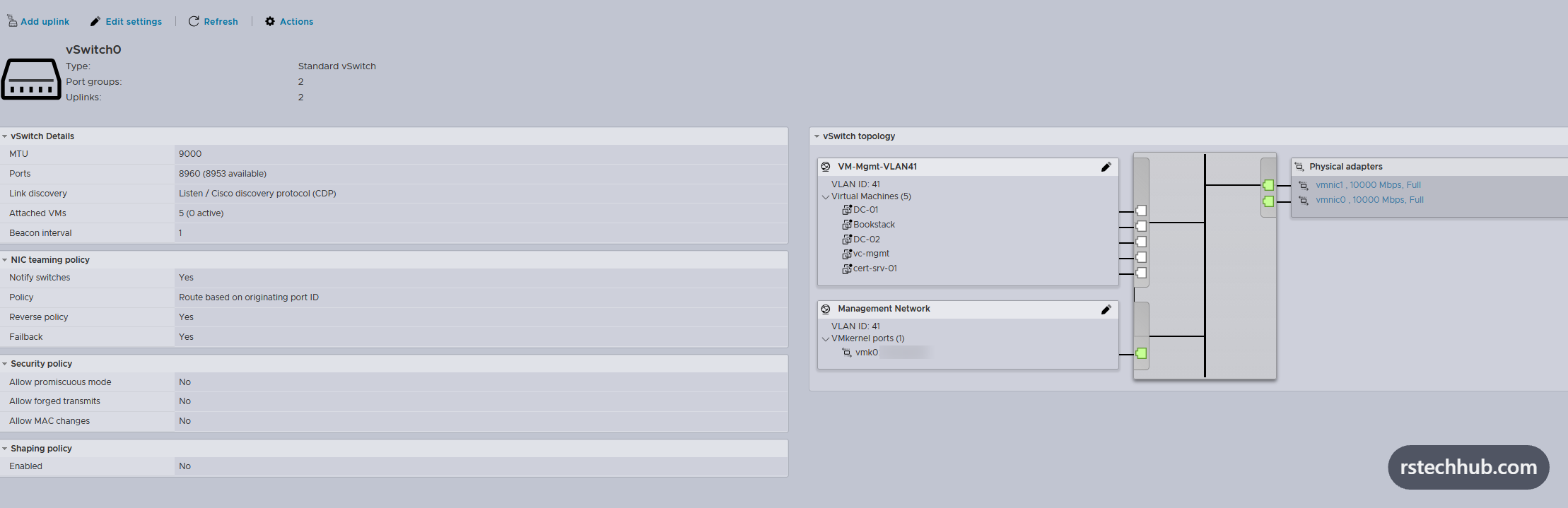
Both P225p ports uplink into a single standard vSwitch, with the management VLAN tagged.
The management network originally ran on a distributed switch owned by the lab vCenter, which itself runs on this host. That is the same circular dependency this series warns about: with vCenter down, the switch still passes traffic but cannot be changed. So the core host now runs on a standard vSwitch instead, and its networking never depends on a VM it hosts. The move took two steps from the iLO console: Restore Standard Switch in the DCUI to rebuild management networking without vCenter, then re-homing the VMs onto a new standard port group.
- One standard vSwitch, MTU 9000, so a jumbo-frame vmkernel (NFS or vMotion) can be added later without touching the switch.
- Two 10 GbE uplinks, both active, load-balanced by originating port.
- Management vmkernel on VLAN 41 at MTU 1500.
- One VM port group on VLAN 41 for the core services.
The old distributed switch objects disappear from the host once the lab vCenter is back and the host is removed from them.
Time
VMs take their clock from the host when they power on, so the host has to be right before any domain controller is built. The DL380 syncs from the CRS309, the same single time source the rest of the lab uses.
esxcli system ntp set --server=<router-ip> --enabled=true
esxcli system ntp get
esxcli system time get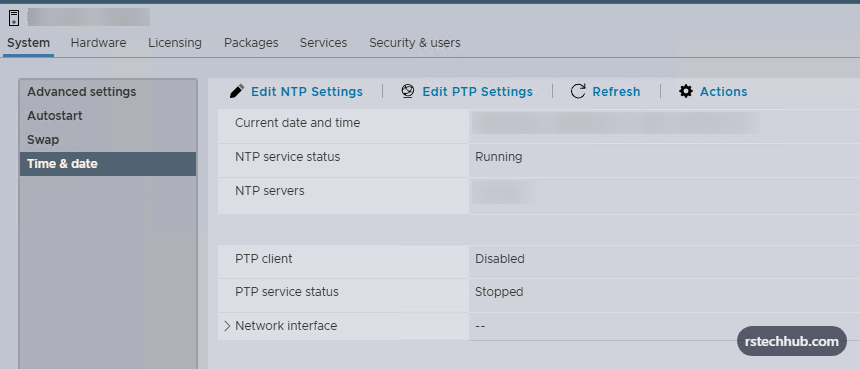
What runs on it
| VM | Role |
|---|---|
| dc01, dc02 | Domain controllers and DNS (Parts 3 and 4) |
| Lab vCenter | Manages the lab hosts and nested environments |
| Certificate authority | Issues LDAPS and appliance certificates (Part 5) |
| Veeam | Backup |
| VCF Installer | Deploys the VCF fleet |
Autostart order is configured once the domain controllers exist, in Part 3.
What else belongs on the core host
768 GB of memory and three arrays leave a lot of headroom once the domain controllers are in. The best use of it is services that make every lab faster to build and easier to troubleshoot, not more experiments.
Planned next
| Service | Why it belongs here |
|---|---|
| VCF offline depot | One depot built with the VCF Download Tool serves every lab, instead of each one downloading from Broadcom. Rebuilds get faster, and they still work when the online depot is slow. |
| Git server | Version control for the switch exports, DNS scripts, runbooks and PowerCLI that make up the lab. It stays private and gives every change a history. |
| Syslog and monitoring | One place for ESX, VCF, NSX and switch logs, with dashboards for host and datastore performance. Troubleshooting starts in one screen rather than five. |
| Admin jump box | A Windows VM with RSAT and PowerCLI, plus a Linux tools VM for Ansible, Terraform and Packer. Every lab gets the same client, and none of it lives on my desktop. |
Later
- A private container registry for vSphere Kubernetes Service labs, including air-gapped scenarios.
- Packer-built Windows and Linux templates, so every lab starts from the same images.
- A simple status page showing which lab services are up.
- Nested VVF and legacy VCF 5.x labs. Nested VCF 9 stays on the R740xd hosts, because nested ESX hosts inherit the Haswell CPU, which ESX 9 does not support.
Guardrails
Adding services is easy. Keeping the core host a core host takes a few rules:
- Two resource pools. Core services (domain controllers, certificate authority, vCenter, backup, depot) get reservations and high shares. Everything else goes in a sandbox pool, so an experiment can never starve DNS.
- Every new VM gets a backup job the day it is created.
- Nothing goes on this host that a lab cannot live without for a few hours, apart from the core services themselves. It is still a single host.
- Sandbox VMs are powered off when they are not in use. A Gen9 at full load is noticeable on the power bill.
Checklist before building the DCs
- Host time matches the CRS309 within a second.
- Datastores healthy on at least two separate arrays.
- A port group on the management VLAN.
- The Windows Server ISO uploaded to a datastore.
Part 3 builds the two domain controller VMs on this host.