

The series started with one Veeam server and ended with three copies of the lab’s backups. This post puts the whole design on one page and says what is still open.
The picture
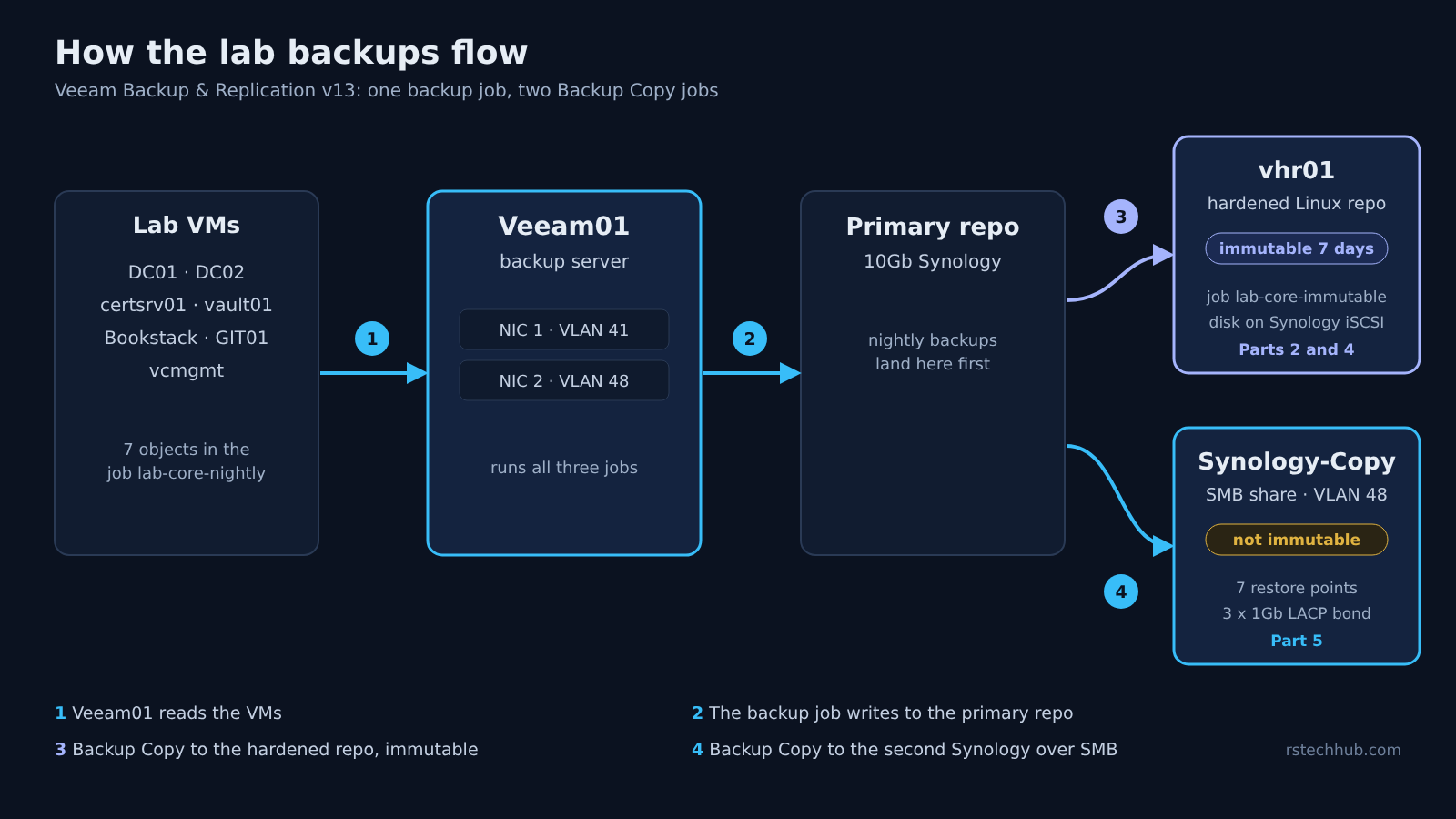
Follow the numbers. Veeam01 reads the lab VMs and writes the nightly backups to the primary repository. Two Backup Copy jobs then take those backups to a hardened Linux repository and to the second Synology.
What each copy is for
Each copy covers a different failure, and each has a limit I know about.
| Copy | Where it lives | What it covers | Limit |
|---|---|---|---|
| Primary | 10Gb Synology, job lab-core-nightly | Everyday restores, fast | One device. If that NAS goes, so does this copy |
| Immutable copy | vhr01, hardened Linux repo, 7 days | Backups nobody can delete for a week | The repo disk is an iSCSI LUN on a Synology, so it needs that NAS to be up |
| Second copy | Synology-Copy, SMB share, 7 restore points | A copy on a separate NAS | An SMB share cannot be immutable in Veeam |
How the five parts fit
- Part 1, Design and the Backup Server: where the backups live, why a Windows server, and veeam01 on the storage VLAN.
- Part 2, Backups Nobody Can Delete: Btrfs snapshots on the Synology, a restore test, and the hardened Linux repository.
- Part 3, Upgrading to v13.1: the in-place upgrade from 12.3.2.
- Part 4, Rebuilding the Hardened Repo: the repo disk moved onto a Synology iSCSI LUN after the old NAS died.
- Part 5, A Second Synology Repo with LACP: the second copy, the three-port bond, and why it ran over one link.
What is still open
- The Veeam server’s own copy path. My robocopy test ran from a Windows PC on VLAN 41, not from Veeam01, so it says nothing certain about how Veeam writes to the NAS. Veeam01 has its own NIC on VLAN 48, and I have not repeated the test from it.
- SMB Multichannel. It opens several connections, which is the only way I know of to spread one copy across the bond. I have not tried it.
- An immutable second copy. The SMB share is not immutable. The hardened repo covers that for seven days.
One habit is worth keeping: read the setting back after you change it. In Part 5 the bond’s hash policy was not what I thought it was, and I only found out by reading it back.