

Update, October 2026: the VM datastore has since moved to a 16K recordsize dataset over NFS 3. The 64K results below are still valid as the before and after for the SLOG. See Part 8 for the recordsize test.
In Part 6 I built a new pool on the R730xd: 22 used 10K SAS drives as 11 mirrors, plus a hot spare, for VM storage over NFS. Mirrors give the pool plenty of random I/O, but there is one thing they cannot fix on their own: sync writes.
ESXi sends NFS writes as sync writes. ZFS cannot confirm a sync write until it is safe on stable storage, in the ZFS intent log (ZIL). With no separate log device, the ZIL lives on the same spinning drives as the data, so every write from a VM waits for a disk. A SLOG moves the ZIL to a fast SSD with power-loss protection. I had a spare HPE 400 GB write-intensive SAS SSD, so I measured the pool before and after adding it.
The test
One small Ubuntu VM, deployed from my Ubuntu template onto the new truenas-vmware NFS 4.1 datastore. Three fio runs of 60 seconds each, on the VM’s own disk:
# 4K random write, the typical VM workload
sudo fio --name=randwrite --filename=/root/fio.test --size=8G --bs=4k --rw=randwrite --iodepth=32 --numjobs=4 --direct=1 --ioengine=libaio --runtime=60 --time_based --group_reporting

# 4K random read
sudo fio --name=randread --filename=/root/fio.test --size=8G --bs=4k --rw=randread --iodepth=32 --numjobs=4 --direct=1 --ioengine=libaio --runtime=60 --time_based --group_reporting

# 1M sequential write
sudo fio --name=seqwrite --filename=/root/fio.test --size=8G --bs=1M --rw=write --iodepth=8 --numjobs=1 --direct=1 --ioengine=libaio --runtime=60 --time_based --group_reporting
Before the SLOG went in I ran the random write test twice, and got 17,700 and 12,100 IOPS. I kept the better run, to be fair to the old setup. While it ran I watched the pool from the TrueNAS shell with zpool iostat -v tank 2.
Before: no SLOG
| Test | IOPS | Throughput | Avg latency | 99th percentile |
|---|---|---|---|---|
| 4K random write | 17,700 | 72 MB/s | 7.2 ms | 52 ms |
| 4K random read | 88,800 | 364 MB/s | 1.4 ms | 4 ms |
| 1M sequential write | 477 | 501 MB/s | 16.3 ms | 44 ms |
The random read number is mostly RAM. The 8 GB test file fits easily in the 256 GB of ARC, so those reads never touch a disk. That is a real benefit for VMs, but it is not disk speed, and a SLOG will not change it.
The random write number is the one to watch. 7 ms on average, with a long tail past 50 ms, is what HDD-backed sync writes look like. ZFS batches them, which is why 17,700 IOPS is still respectable, but every batch waits for spinning disks.
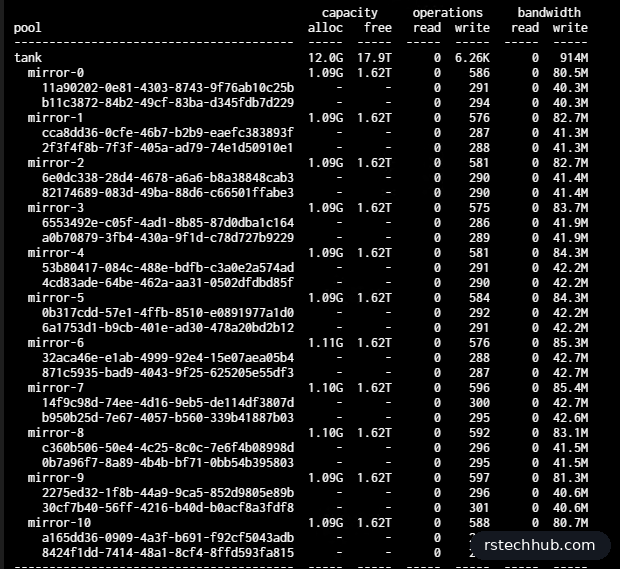
The iostat output shows two things. All eleven mirrors share the work evenly, which is the point of the mirror layout. And the pool writes far more than fio sends: about 914 MB/s on the disks for 72 MB/s from the VM. That is write amplification. The vmware dataset uses 64K records, so a 4 KB change rewrites a whole 64 KB record, and the data also goes through the ZIL first. Real VM traffic is a mix of sizes, so it is rarely this extreme, but a smaller record size is worth testing for random-heavy VMs.
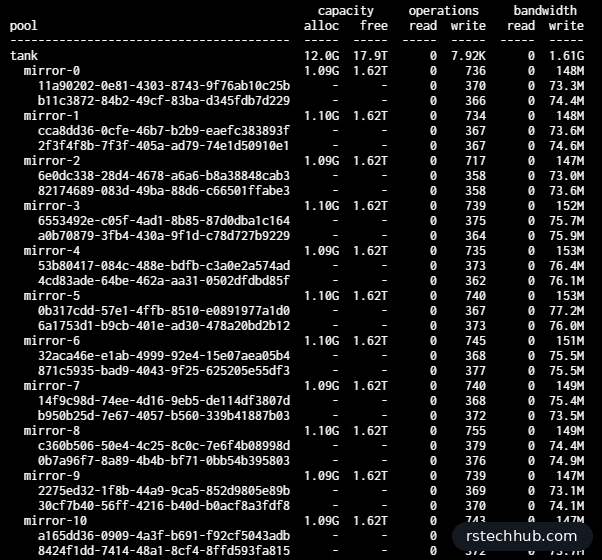
At its peak the pool absorbed 1.61 GB/s across 22 disks, more than the 10 Gb link to the hosts can deliver. For large sequential writes the network is the ceiling, not the disks.
Adding the SLOG
The SSD is an HPE EO000400JWDKP: 400 GB, 12G SAS, write intensive, with power-loss protection. It came out of an R740xd, so I moved it into a 13G caddy and put it in slot 10. That bay was free after I retired a dead drive in Part 6.
The first time I slid it in, iDRAC showed its SAS address but no model and a size of 0. I pulled it, reseated it firmly, and it came up. If you see the same thing, reseat before you start blaming the backplane.
Then I checked it from the TrueNAS shell. After Part 6 I wasn’t going to trust a used drive’s format.
# TrueNAS shell
lsblk -d -o NAME,SIZE,MODEL,SERIAL | grep -v ST1800
sudo sg_readcap -l /dev/sdk | grep prot_en
It showed up as sdk, 372.6 GB, with prot_en=0. No format needed this time.
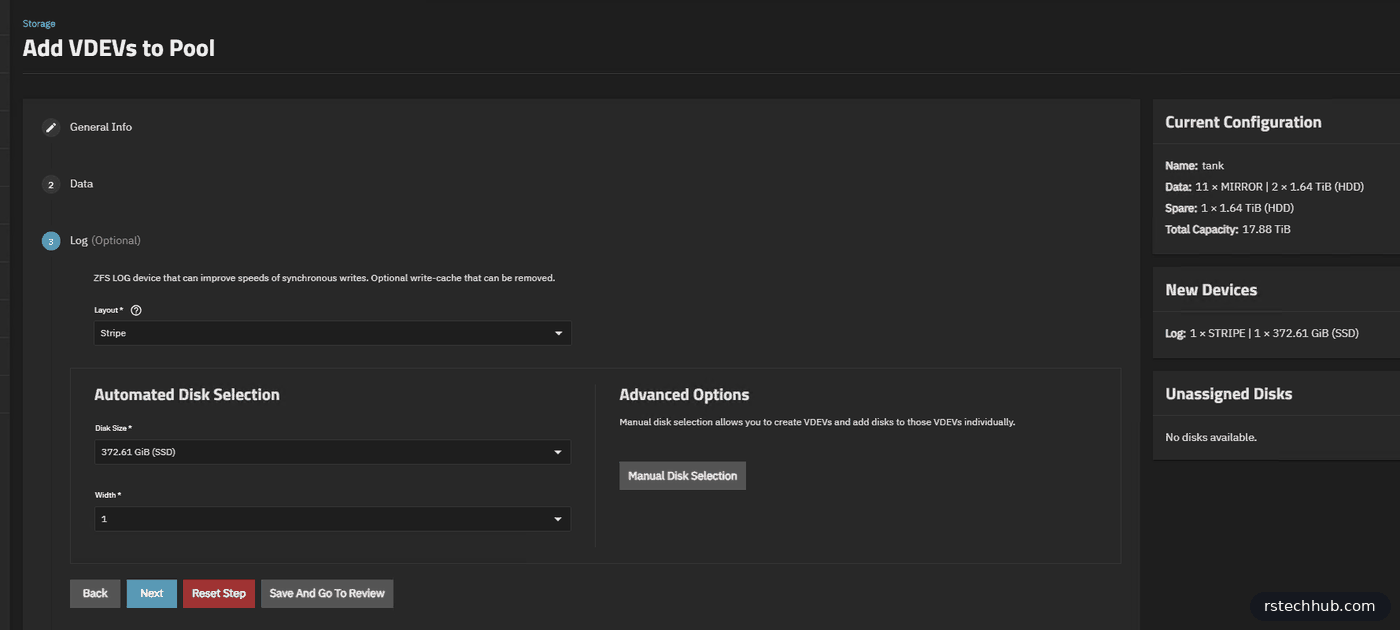
Adding it takes a minute. The Storage dashboard listed one unassigned disk, so I clicked Add To Pool, picked the existing pool tank, and went to the Log step. Layout Stripe, disk size 372.61 GiB (SSD), width 1. Then Save And Go To Review, and Update Pool.
# TrueNAS shell
sudo zpool status tank | grep -A2 logs
The log device shows ONLINE under logs. One SSD is fine for a lab. If it dies, ZFS goes back to using the pool for the ZIL. You only lose in-flight writes if the SSD fails at the same moment as a power cut. If that risk bothers you, mirror two SSDs.
After: with SLOG
Same VM, same three fio commands, same file.
| Test | IOPS | Throughput | Avg latency | 99th percentile |
|---|---|---|---|---|
| 4K random write | 37,400 | 153 MB/s | 3.4 ms | 5.9 ms |
| 4K random read | 36,900 | 151 MB/s | 3.5 ms | 4.5 ms |
| 1M sequential write | 886 | 929 MB/s | 9.0 ms | 15.9 ms |
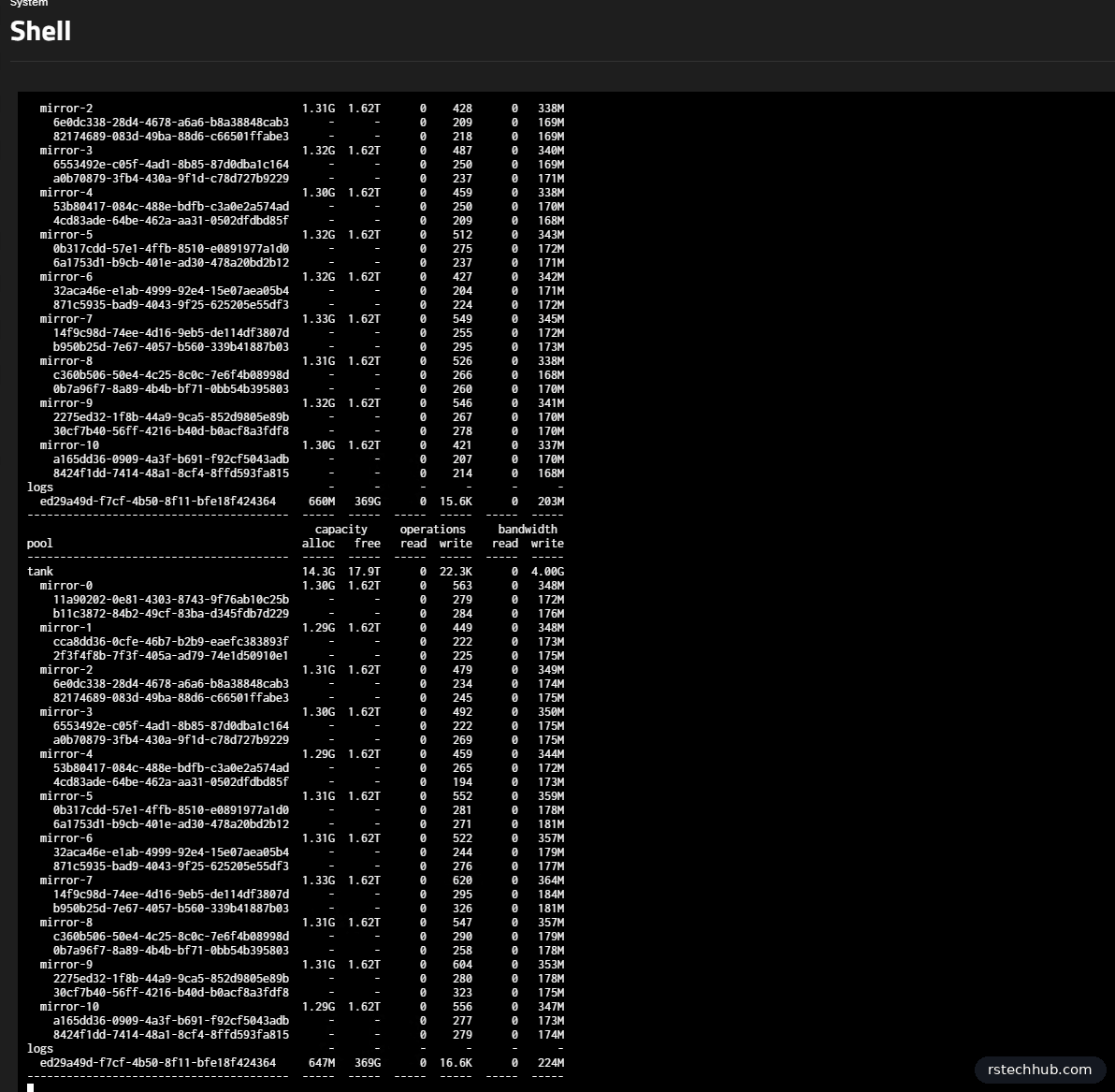
During the random write test the log device took about 16,600 writes a second. Those are the sync writes, confirmed from the SSD as soon as they land. The mirrors still do the real work, but now they get it in batches every few seconds instead of a VM waiting on them for each write.

The sequential test pushed the SSD to about 920 MB/s. That is close to the limit of a single 12G SAS SSD, so for large writes the SLOG is now the ceiling. Two SSDs would raise it.
Before and after

| Metric | No SLOG | With SLOG | Change |
|---|---|---|---|
| 4K random write IOPS | 17,700 | 37,400 | 2.1x |
| 4K random write throughput | 72 MB/s | 153 MB/s | 2.1x |
| 4K random write avg latency | 7.2 ms | 3.4 ms | 2.1x lower |
| 4K random write p99 latency | 52 ms | 5.9 ms | 9x lower |
| 1M sequential write | 501 MB/s | 929 MB/s | 1.9x |
The p99 number is the one I care about most. A VM doesn’t feel the average. It feels the slow writes, and those dropped from 52 ms to under 6 ms.
Reads went down, from 88,800 to 36,900 IOPS, and I want to be straight about that. A SLOG never serves reads. iostat showed zero disk reads in both runs, so ARC answered every read both times. In the first run about a third of reads finished in under 50 microseconds, which is too fast for an NFS round trip, so something closer to the VM was answering. The second run shows real NFS latency of about 3.5 ms. I left reads out of the chart because the SLOG plays no part in them.
Was it worth it?
For VMs on NFS, yes. Random sync writes doubled and the slow tail almost disappeared. The SSD was sitting on my shelf, and used write-intensive SAS SSDs are cheap. Pick one with power-loss protection. A consumer SSD without it can make sync writes slower.
Previous parts: Part 6: R730xd and DIF SAS drives, Part 4: VMware over NFS.