

In Part 7 a SLOG doubled random write speed on my VM datastore. One number from that test kept bugging me, though. fio in the VM wrote 72 MB/s, and zpool iostat showed the pool writing over 900 MB/s at the same time.
That gap is the recordsize. My vmware dataset uses 64K records. When a VM changes 4K in the middle of a record, ZFS writes a new copy of the whole 64K record. Small random writes, the bread and butter of VMs, turn into much bigger disk writes. A smaller recordsize should waste less. So I tested 16K against 64K.
The plan
Recordsize only applies to blocks written after you set it. Changing it on the live dataset would leave every existing VM at 64K until its data got rewritten. So I made a new dataset at 16K, mounted it in ESXi, and moved the test VM onto it with Storage vMotion. That copies every block, so the whole disk lands at the new recordsize.
Same VM, same fio commands and the same pool with the same SLOG as Part 7. Only the recordsize should change.
Step 1: the dataset
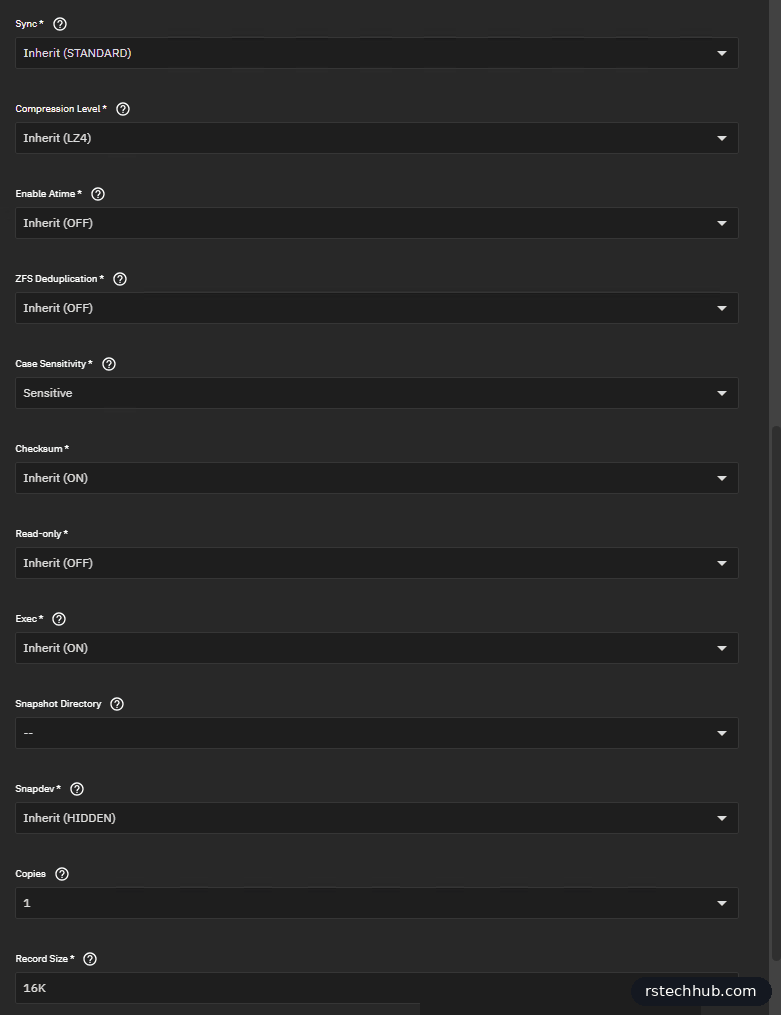
In the TrueNAS UI: Datasets, select tank, Add Dataset. I named it vmware16k with the Generic preset. Under Advanced Options I set Record Size to 16K and left everything else to inherit from tank, which already has sync standard, LZ4 and atime off.
Then an NFS share for /mnt/tank/vmware16k, limited to the storage network, with maproot set to root and wheel. Same settings as the main vmware share.
Step 2: mount it, and an NFS 4.1 bug
My main datastore is NFS 4.1, so I mounted the new share the same way from the ESXi shell:
# ESXi shell (SSH)
esxcli storage nfs41 add -H <truenas-ip> -s /mnt/tank/vmware16k -v truenas-vmware16k
The Storage vMotion failed. Twice. vCenter only said “Failed to load one or more destination disks”. The VM’s vmware.log had the real reason:
fiotest-flat.vmdk: failed to open (The file specified is not a virtual disk):
Size of extent in descriptor file larger than real size.
I’ve seen this before. ESXi 8.0 U3 on NFS 4.1 sometimes reads back the wrong size for a disk file it has just created, while TrueNAS has the file at the right size. It happened to me once already with a new VM disk, which I wrote up in The Thin Disk That Was 0 Bytes. It comes and goes: a 1 GB test disk I made with vmkfstools on the same share came out fine. The fix both times was NFS 3.
# ESXi shell (SSH)
esxcli storage nfs41 remove -v truenas-vmware16k
esxcli storage nfs add -H <truenas-ip> -s /mnt/tank/vmware16k -v truenas-vmware16k
After that the migration finished with no complaints.
Making it a fair test
My first 16K results looked great, but I had changed two things at once: recordsize and protocol. The 64K baseline from Part 7 ran over NFS 4.1. Random reads jumped by almost 40%, and recordsize shouldn’t do that to reads served from RAM. So I made a second test dataset, vmware64k, with Record Size 64K, shared and mounted it the same way over NFS 3, and ran everything again.


I moved the VM to each datastore in turn and ran the same three fio tests from Part 7, with zpool iostat -v tank 2 running on TrueNAS.
Results
| Test | 64K | 16K | Change |
|---|---|---|---|
| 4K random write IOPS | 33,700 | 43,500 | +29% |
| 4K random write throughput | 138 MB/s | 178 MB/s | +29% |
| 4K random write avg latency | 3.8 ms | 2.9 ms | 24% lower |
| 4K random write p99 latency | 9.0 ms | 5.3 ms | 41% lower |
| Pool disk writes during that test | about 3.5 GB/s | about 1.7 GB/s | half |
| 1M sequential write | 945 MB/s | 924 MB/s | no real change |
| 4K random read (from ARC) | 46,400 | 51,300 | +10% |
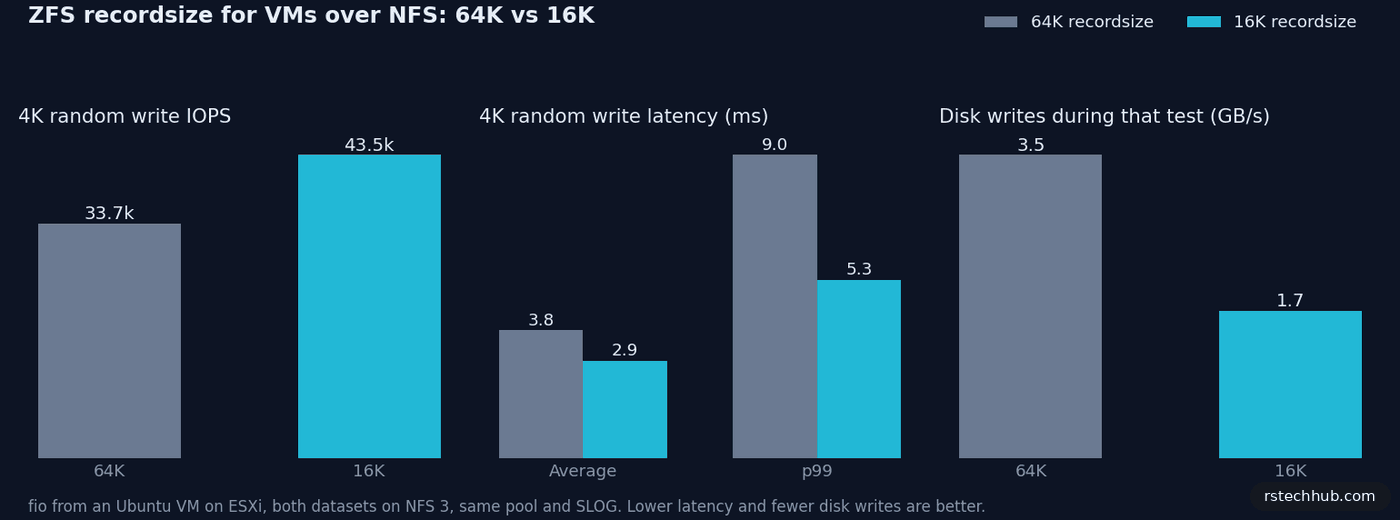
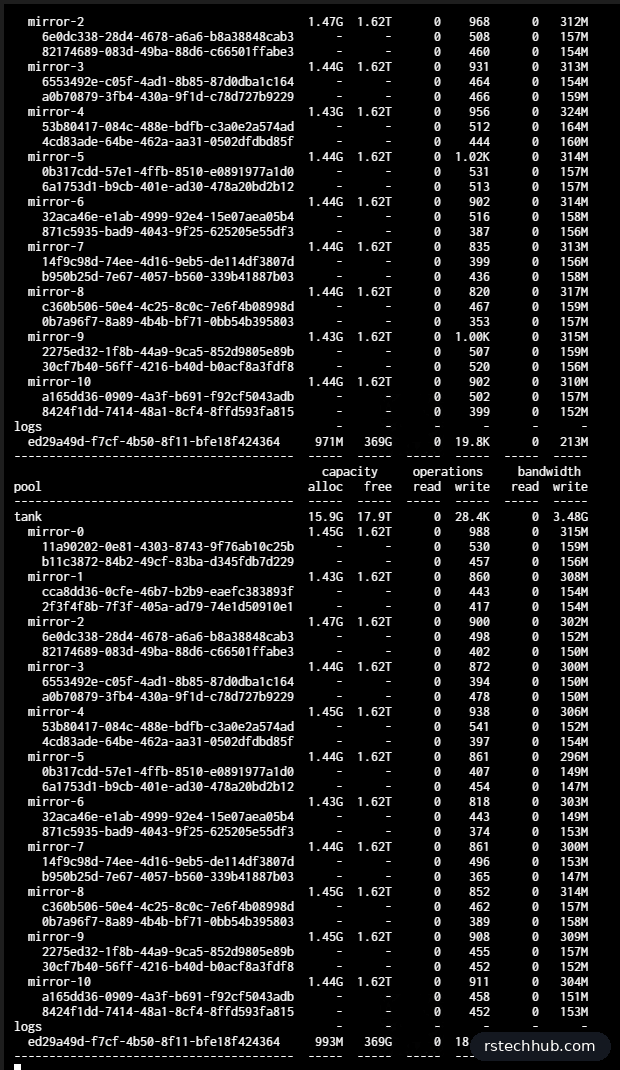
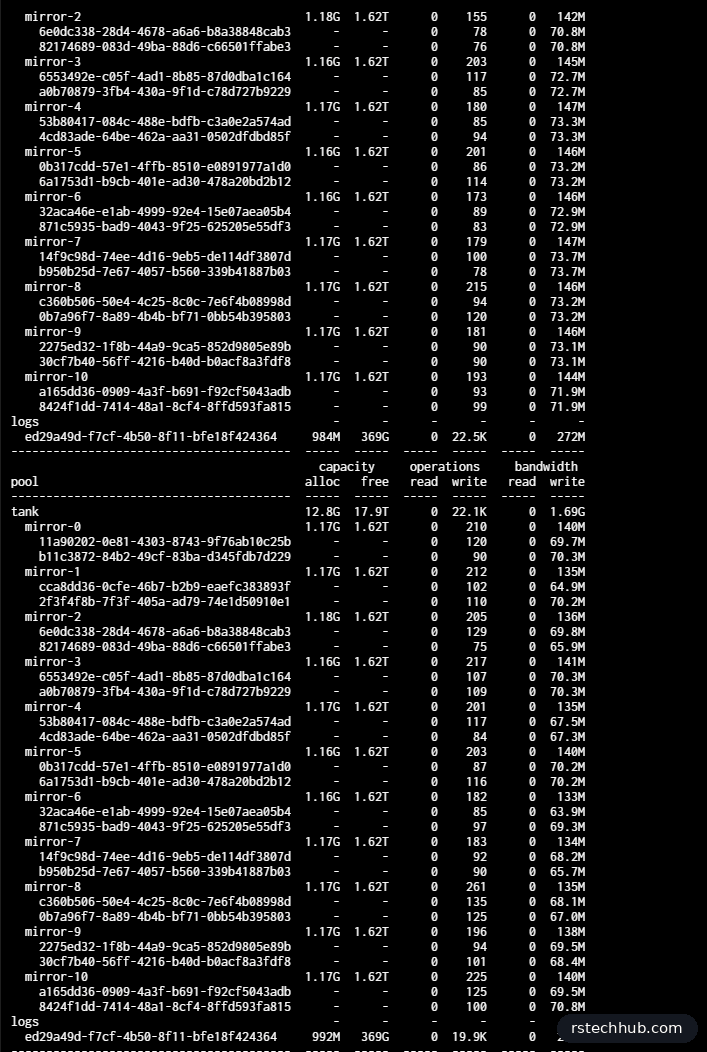
The iostat screenshots tell the story better than fio does. Same test, roughly the same number of writes hitting the SLOG, but at 64K the mirrors were writing about 3.5 GB/s between them. At 16K they wrote about 1.7 GB/s. Half the disk work, and the VM got more done.
Sequential writes didn’t move. The SLOG SSD tops out around 900 MB/s, and it’s the limit for both. Reads came from ARC both times, so the small gain there is mostly noise.
A side result: NFS 3 against NFS 4.1
Because I ran 64K on both protocols, I got a protocol comparison for free. On NFS 3, random reads were about 25% faster (46,400 against 36,900 IOPS) and random writes about 10% slower (33,700 against 37,400). One run each, so I wouldn’t read too much into it. Add the disk-size bug, though, and NFS 3 is where my datastores are going.
What I’m changing
My VM datastore now runs on the 16K dataset over NFS 3. Recordsize can’t be changed for data that’s already written, so I moved the VMs across with Storage vMotion. Then I unmounted the old 64K datastore and the 64K test share, deleted both datasets, and renamed the 16K datastore to nfs-truenas-01, so its name says what it is.
One last NFS 4.1 surprise: TrueNAS refused to delete the old dataset with “pool or dataset is busy”, even after ESXi had unmounted it and the share was gone. fuser showed only the kernel holding it, which was leftover NFS 4.1 state. Restarting the NFS service cleared it. The NFS 3 datastore paused for a few seconds and carried on.
16K isn’t right for everything. It suits general VMs doing lots of small random I/O. A datastore full of big sequential files, like ISOs or backups, is better with a larger recordsize. Metadata overhead also goes up a little at 16K, and compression has less to work with per block.
Lessons
- Watch
zpool iostatnext to your benchmark. The gap between what the VM writes and what the disks write is where recordsize shows up. - Test in a new dataset. Recordsize only affects new writes, and Storage vMotion rewrites every block.
- Change one thing at a time. My first comparison mixed recordsize and protocol and overstated the gain.
- If Storage vMotion to NFS 4.1 fails with “Size of extent in descriptor file larger than real size”, try NFS 3.
Earlier parts: Part 7: Does a SLOG help VMs over NFS?, Part 6: R730xd and DIF SAS drives, Part 4: VMware over NFS.