

My TrueNAS box has been a Dell R620 since Part 1. It did the job until the lab outgrew it. Once ESX ISOs, VCF binaries, vCenter backups and Veeam all landed on the same pool, I ran out of space.
Then I found a deal I couldn’t ignore: 24 x 1.8 TB and 15 x 2 TB 12G SAS drives, all used. The 1.8 TB drives went into a Dell R730xd with an HBA330 Mini, which gives TrueNAS direct access to every disk. I expected a quick pool build. Instead TrueNAS refused every single drive.
This post covers what was wrong with the drives and how I fixed them. If you buy used enterprise SAS drives, read this before you plan your weekend around them.
Earlier parts of the series: Part 1: Installation, Part 2: Pool and NFS, Part 3: Tuning and protection, Part 4: VMware over NFS, Part 5: Storage VLAN and certificate.
Setting up TrueNAS on the R730xd was the same process as on the R620, so I won’t repeat it here. The install, pool and NFS shares, ZFS tuning, the VMware connection and the storage VLAN are all in Parts 1 to 5, and they work the same on the new box. This post sticks to the part that was different: the drives.
The hardware
| Part | What I used |
|---|---|
| Server | Dell PowerEdge R730xd |
| CPU | 2 x Intel Xeon E5-2698 v4 @ 2.20GHz (20 cores each) |
| RAM | 256 GB (8 x 32 GB DDR4-2133, dual rank) |
| Network | Mellanox ConnectX-4 Lx 25GbE dual port rNDC |
| Power | 2 x 750 W AC PSU (redundant) |
| Controller | Dell HBA330 Mini (IT mode, no RAID) |
| Drives | 24 x IBM OEM Seagate ST1800MM0129, 1.8 TB 12G SAS |
| Pool | 11 x 2-way mirrors + 1 hot spare, 17.64 TiB usable |
| More drives | 15 x Seagate ST2000NX0263, 2 TB 12G SAS |
| Boot | PCIe boot card (NVMe) |
| OS | TrueNAS Scale 25.10.7 |
The problem
Every drive showed up in the HBA, and the pool wizard listed them all as available. I picked RAIDZ2 across the 14 drives and clicked Create.
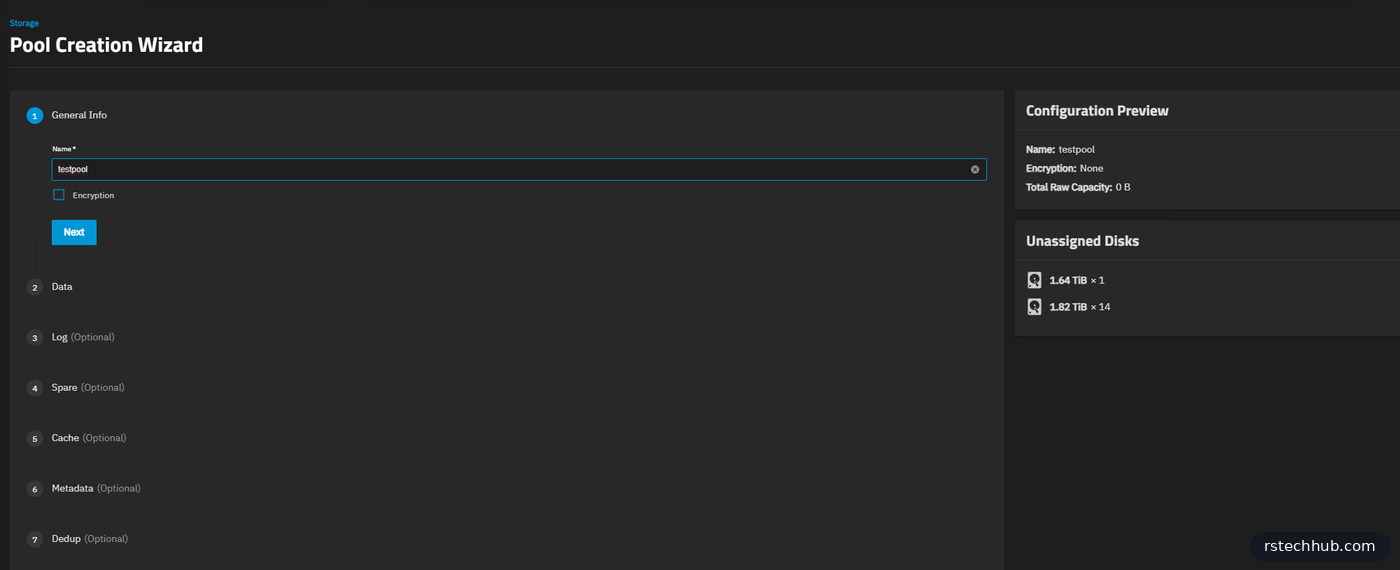
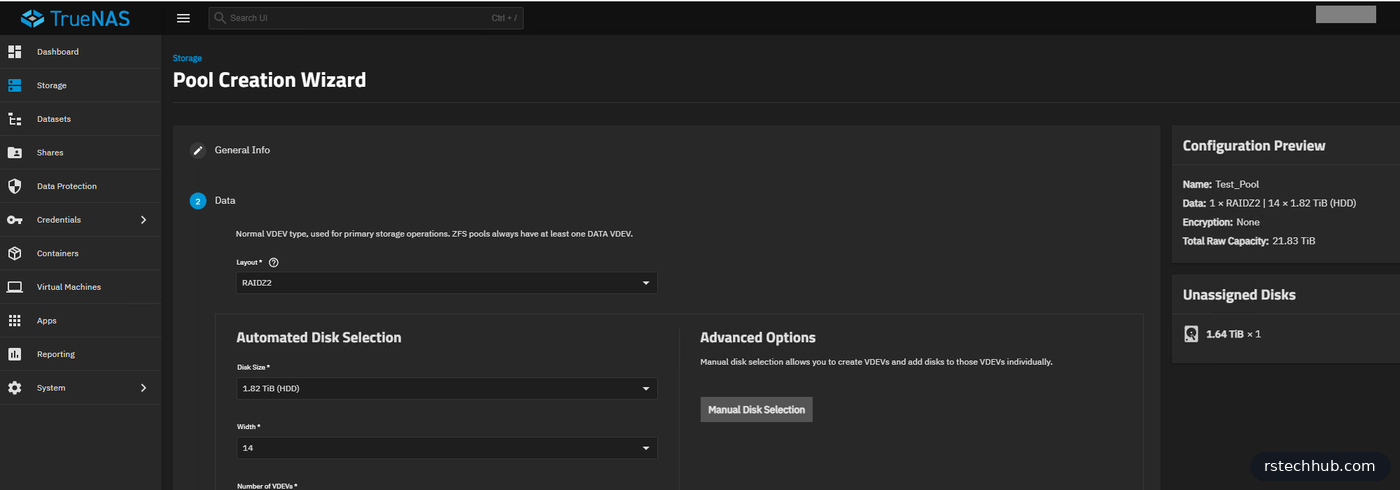
TrueNAS refused as soon as it touched the first disk:
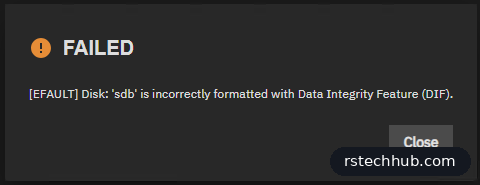
The screenshots in this post come from the 15 x 2 TB Seagate drives. They arrived with exactly the same DIF format as the 1.8 TB IBM drives, so I got to do the whole thing twice.
The reason is how IBM ships these drives. They come formatted for their storage arrays with 4096-byte sectors plus 8 bytes of protection information on every sector, so each sector on disk is 4104 bytes. smartctl spells it out: “Formatted with type 2 protection, 8 bytes of protection information per logical block”. That extra data is T10 Protection Information, also called DIF. The array controller uses it to check every block end to end. TrueNAS on a plain HBA has no use for it and won’t build a pool on it.
You can confirm it before you touch anything. Open a shell on TrueNAS, either System, then Shell in the web UI, or SSH as the admin user, and run:

# TrueNAS shell (SSH as admin)
sudo sg_readcap -l /dev/sda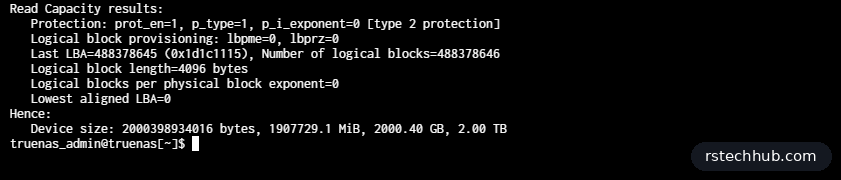
Look at the Protection line. prot_en=1 means the drive is formatted with protection information. A drive TrueNAS will accept shows prot_en=0.
What didn’t work
My first try was to reformat to 512-byte sectors, since that is what most guides show. The IBM firmware refused with exit code 5, Illegal Request. Fast format (--ffmt=1) failed the same way. These drives only accept a full low-level format, and only at the sector size they were built for.
The fix
Keep the 4096-byte sectors and strip the protection information. Everything below runs on the TrueNAS shell over SSH. A format wipes the drive, so check the drive list twice and make sure your boot device isn’t in it. lsblk -o NAME,SIZE,MODEL shows which is which.
Step 1. Start a tmux session. A low-level format on 24 drives takes hours, and if your SSH session drops without tmux, you lose track of everything.
# TrueNAS shell
tmux new -s diskformat
# reconnect later with: tmux attach -t diskformat
Step 2. Kill any format still running from earlier attempts. I had a few hung ones from the failed 512 tries.
# TrueNAS shell, inside tmux
sudo killall -9 sg_format
Step 3. Run one sudo command first so the password is cached. Otherwise 24 background jobs all ask for it at the same time.
# TrueNAS shell, inside tmux
sudo ls /root
Step 4. Format all drives in parallel. --size=4096 keeps the native sector size and --fmtpinfo=0 turns protection information off. Each drive logs to its own file in /tmp.
# TrueNAS shell, inside tmux
# edit the list to match your data drives only
for drive in sda sdb sdc sdd sde sdf sdg sdh sdi sdj sdk sdl \
             sdm sdn sdo sdp sdq sdr sds sdt sdu sdv sdw sdx; do
    echo "Formatting /dev/${drive}..."
    sudo sg_format --format --size=4096 --fmtpinfo=0 /dev/${drive} > /tmp/sg_${drive}.log 2>&1 &
done
Step 5. Check progress. Run this as often as you like.
# TrueNAS shell
for drive in sda sdb sdc sdd sde sdf sdg sdh sdi sdj sdk sdl \
             sdm sdn sdo sdp sdq sdr sds sdt sdu sdv sdw sdx; do
    echo -n "/dev/${drive}: "
    sudo sg_turs --progress /dev/${drive} 2>&1 | grep -iE "progress|ready|complete" || echo "Finished"
done
The same check about 30 minutes later, at roughly 12% every half hour:
# TrueNAS shell, about 30 minutes in
/dev/sdb: Progress indication: 12.01% done
/dev/sdc: Progress indication: 11.92% done
/dev/sdd: Progress indication: 11.77% done
/dev/sde: Progress indication: 12.07% done
/dev/sdf: Progress indication: 11.92% done
/dev/sdg: Progress indication: 11.89% done
/dev/sdh: Progress indication: 11.77% done
/dev/sdi: Progress indication: 11.84% done
/dev/sdj: Progress indication: 11.71% done
/dev/sdk: Progress indication: 11.62% done
/dev/sdl: Progress indication: 11.69% done
/dev/sdm: Progress indication: 12.01% done
/dev/sdn: Progress indication: 12.05% done
/dev/sdo: Progress indication: 11.92% done
It slowed down towards the end. All 14 drives finished after about five and a quarter hours:
# TrueNAS shell, about 5 hours 15 minutes in
/dev/sdb: Finished
/dev/sdc: Finished
/dev/sdd: Finished
/dev/sde: Finished
/dev/sdf: Finished
/dev/sdg: Finished
/dev/sdh: Finished
/dev/sdi: Finished
/dev/sdj: Finished
/dev/sdk: Finished
/dev/sdl: Finished
/dev/sdm: Finished
/dev/sdn: Finished
/dev/sdo: Finished
A full low-level format on a 1.8 TB SAS drive takes hours. Running all 24 at once meant I only waited once.
Step 6. When every drive reports finished, power the server off completely. I wanted the HBA330 to come up clean rather than carry its old view of the drives through a warm reboot.
# TrueNAS shell
sudo poweroff
I waited 30 seconds and powered it back on. TrueNAS then listed the formatted drives as plain 4Kn drives with no protection information. Run sg_readcap -l again and protection is off:
# TrueNAS shell, one of the 1.8 TB drives after the format and cold boot
Read Capacity results:
   Protection: prot_en=0, p_type=0, p_i_exponent=0
   Logical block provisioning: lbpme=0, lbprz=0
   Last LBA=439541045 (0x1a32dd35), Number of logical blocks=439541046
   Logical block length=4096 bytes
   Logical blocks per physical block exponent=0
   Lowest aligned LBA=0
Hence:
   Device size: 1800360124416 bytes, 1716957.2 MiB, 1800.36 GB
Same 4096-byte blocks as before, but prot_en=0 and no protection type. That is all TrueNAS needed.
Check every drive, not just one
With the 24 IBM drives back in, I checked one drive, saw prot_en=0 and nearly went straight to the pool wizard. Then I ran the check across every disk:
# TrueNAS shell
for d in /dev/sd?; do echo -n "$d: "; sudo sg_readcap -l $d 2>/dev/null | grep -o "prot_en=[01]"; done
Most came back prot_en=0. Three did not, and each one had a different story.
The first had simply never been formatted. It was sitting in the server while I formatted a different batch, so it still had DIF on it. It went through the same sg_format as the rest.
The second returned nothing at all. dmesg showed why:
Sense Key : Medium Error [current]
Add. Sense: Medium format corrupted
That is what a drive looks like after a format that never finished, most likely one of the hung sg_format runs I killed early on. Linux had also marked it read-only, so I had to send the format through its /dev/sgN device instead of /dev/sdX (lsscsi -g shows which is which). The drive still refused, this time with Data protect, and smartctl reported a serious hardware error. After a cold boot it accepted the format, reported FORMAT UNIT Complete within seconds, and still came back as “Medium format corrupted” with zero blocks. A real format on these drives takes hours, so a few seconds means the drive did nothing. It is scrap.
The third looked fine to Linux but iDRAC had a warning on its bay: Failure Predicted: Yes. smartctl said the health was OK, yet the grown defect list was full:
SMART Health Status: OK
Elements in grown defect list: 8192
A healthy drive has zero or close to it in that list. 8192 means it has been remapping bad sectors for a long time and has run out of room. It stays out of the pool.
To find a drive in iDRAC, I matched the WWN from lsblk -d -o NAME,WWN,SERIAL against the SAS address in Storage, Physical Disks, then used the Identify tab to blink the bay. It saved me from pulling the wrong drive, which I had already done once.
Then I made my own mistake. Two drives were at 95% when I powered the server off for the cold boot, thinking they were done. After the boot lsblk showed both at 0B. A format that does not finish leaves the drive with no usable capacity at all, so both went through the full format again, another few hours each. Check every drive reports Finished before you power anything off.
So out of 24 used drives, two are scrap. For the price I paid, I can live with that.
The pool
That left 23 good drives. My first plan was two RAIDZ2 vdevs of 11 drives, about 26 TiB usable. Then I remembered what this pool is for: virtual machines over NFS, not just backups.
VM traffic is lots of small random reads and writes from many machines at once, so IOPS matter more than raw capacity. For random I/O a RAIDZ vdev behaves roughly like a single disk, because every write touches the whole stripe plus parity. Two RAIDZ2 vdevs would give me about two disks worth of random performance. A mirror vdev is just two copies: writes go to both disks and reads can come from either. Eleven mirrors give roughly eleven disks worth of writes and up to twenty-two for reads. Rebuilds are faster too, because a mirror copies from one partner disk instead of reading every disk in the vdev.
So the pool is 11 two-way mirrors plus one hot spare. The price is half the raw space.

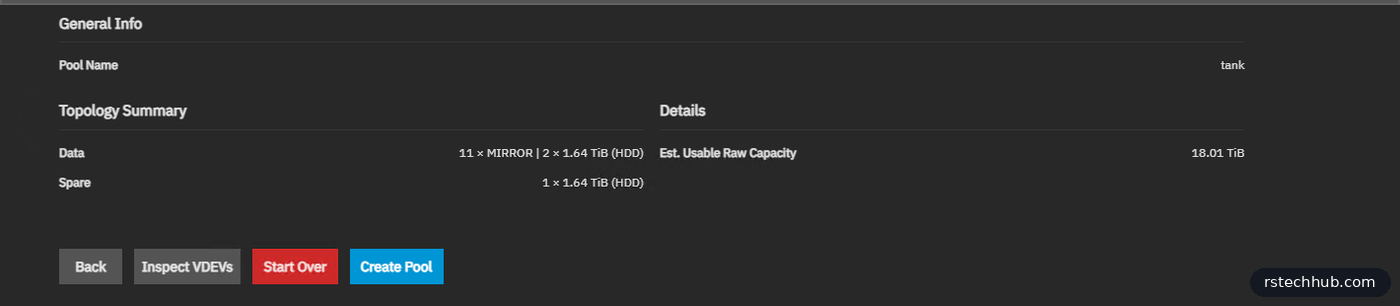

17.64 TiB usable. The R620 had ten 1 TB drives in total. The pool is called tank again, so the NFS share paths stay the same as before. ESXi uses sync writes over NFS, so the next upgrade is a small power-loss-protected SSD as a SLOG.
Lessons
- Ask the seller whether the drives came out of an IBM, NetApp or EMC array. If they did, expect DIF or odd sector sizes.
- Run
sg_readcap -lon every drive, before and after, not just one. - Never kill
sg_formatpart way through. A half-formatted drive comes back with “Medium format corrupted”. - Never power off while a format is still running, even at 95%. The drive comes back at 0 bytes and you start again.
- Check iDRAC for predicted failures. SMART can say OK while the grown defect list is full.
- If the firmware rejects 512, try 4096 with
--fmtpinfo=0before giving up on the drives. - Use tmux. Hours-long formats and flaky SSH sessions don’t mix.
- Cold boot after the format, not a warm reboot.
The drives cost me a fraction of new ones, so the extra work was worth it. The 2 TB drives are reformatted and back on the shelf for now. They are 7,200 rpm, so slower than the 10K IBM drives, and will probably end up in the HP DL380 or the old R620 once I decide what they are for.